Participating Frequently
April 1, 2019
Question

Drop down menu copying selection in Acrobat Pro XI

  • April 1, 2019
  • 4 replies
  • 3487 views

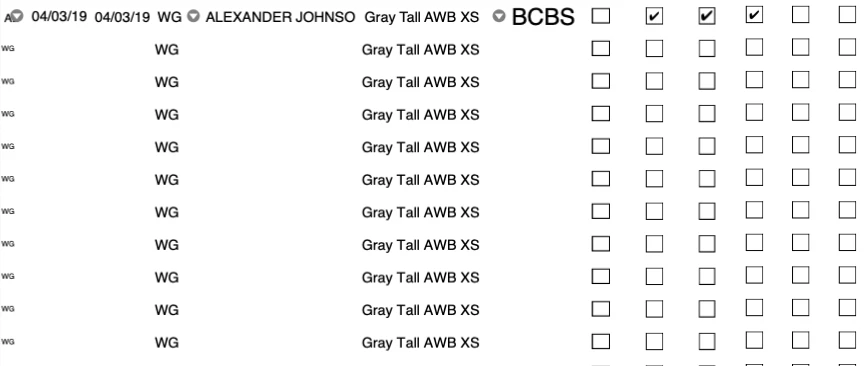
Hello.  I am currently using Acrobat Pro XI and created a form with multiple drop down menu boxes.  The problem is that all the drop-down menus are changing to the selected item that I choose on one of the drop-down menu boxes, even though they are all named different because I added numbers at the end of the title.  Example: TextBox1.0, TextBox 1.1, TextBox 1.2, etc.  Any help will be greatly appreciated.
This topic has been closed for replies.

4 replies

UmalsterAuthor
Participating Frequently
April 9, 2019

oh, that makes sense.  Is there a way I can force the recipient of the email to open only be able to open it in Reader, not Preview?

try67
Community Expert
Community Expert
April 9, 2019

Unfortunately, no.

UmalsterAuthor
Participating Frequently
April 9, 2019

Sorry, I was not clear on the issue.  When you are working on Adobe Acrobat DC or Reader, it looks fine, but when it is saved and opened in Preview, that is where the problem lies.  You see all the below boxes filling in with the choice you have made on the last dropdown box.  There is a button at the bottom of the form, that when pressed, it will create an email in order to mail out a PDF file.  When the email preview pops up, there you can see where the form is bad.

try67
Community Expert
Community Expert
April 9, 2019

Apple Preview is known to be a buggy application that corrupts PDF files in various ways. You should avoid using it.

UmalsterAuthor
Participating Frequently
April 8, 2019

Here is the link.. Dropbox - Stock Form.pdf

Bernd Alheit
Community Expert
Community Expert
April 8, 2019

I can't see the problem with Adobe Acrobat DC.

Bernd Alheit
Community Expert
Community Expert
April 1, 2019

Use names like TextBox1, TextBox2, ...

UmalsterAuthor
Participating Frequently
April 1, 2019

Thank you for the reply, but it did not fix the problem.  Is there anything that I missed?

try67
Community Expert
Community Expert
April 1, 2019

Did you use some kind of script to apply the values in the fields? Can you share the file with us (via Dropbox, Google Drive, Adobe Document Cloud, etc.)?