
Participating Frequently
December 6, 2024
Question

Dropdown list can not display Verdana Bold font and Adobe Acrobat gets freezing

  • December 6, 2024
  • 2 replies
  • 2007 views

Hi, I am using Adobe Acrobat DC with the latest updates on Windows 11 Enterprise and looks like it has a bug as the dropdown list can not display Verdana Bold font.
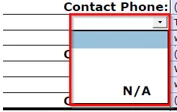


Also, after I use it for a while or open certain amounts of forms, it will freeze and has to close it from the Task manager.


Please have a look into this.


Thanks.

This topic has been closed for replies.

2 replies

Thom Parker
Community Expert
Community Expert
December 6, 2024

The bug is most likely in the form. To use Verdana in a form field, Acrobat must fully embed the font in the AcroForm section of the PDF. If the font is not embedded or it is corrupted, then you would see behavior like you've described. 

I'd suggest trying a different font (type 1 would be best) and then optimizing the PDF.  This should remove the problem font. Then try changing the field font back to Verdana. 


Thom Parker - Software Developer at PDFScriptingUse the Acrobat JavaScript Reference early and often
weiwang88Author
Participating Frequently
December 9, 2024

hi, what do you mean by type 1 font?  Do I have to change the whole form font type (all the fields and contents) to be this font then to optimize it?


As for the embeding or corruption issue, I have all other fields like textfields all over the forms and they are fine.  Hard to believe this is the reason.


thanks for all the info.

weiwang88Author
Participating Frequently
December 9, 2024

Hi, the cause is found due to use Foxit to further reducing the form size. Adobe cannot reduce the form size properly sometimes. 


thanks

try67
Community Expert
Community Expert
December 6, 2024

Works fine for me:


Did you add the field in Acrobat?

weiwang88Author
Participating Frequently
December 6, 2024

Yes, this is a dropdown list added. When I changed to Verdana or Arial Bold or just , it shows.


try67
Community Expert
Community Expert
December 6, 2024

Maybe the font file got corrupted. Are you able to use it in other apps, like Word?