Participant
April 17, 2023
Answered

Dropdown selection leading to Autofill column in PDF

  • April 17, 2023
  • 1 reply
  • 1255 views

Dear experts,

Im a beginner at this. I'm trying to create a form where if a particular leave is selected from a dropdown option, then a related clause to that leave will be autofilled in the next box (in this case 'Text 2' box). Could you please help me with the appropriate script for this? .. and as dumb as it sounds. where the script should be placed (ie: "text2" or 'leave1")
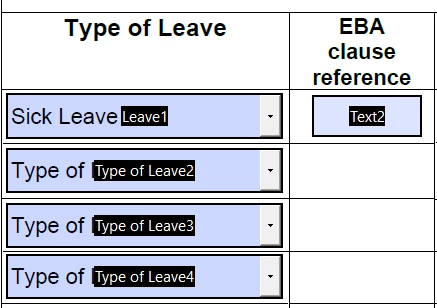


Much appreciated

Miss Confused

This topic has been closed for replies.
Correct answer Nesa Nurani

Script should go to "Leave1" under 'Validate':

var f = this.getField("Text2");
if(event.value == "Type of leave 1 goes here")
f.value = "Text for type of leave 1 goes here";
else if(event.value == "Type of leave 2 goes here")
f.value = "Text for type of leave 2 goes here";
//add more 'else if' here as needed
else
f.value = "";


When you write field names in your question you need to be specific, luckily you posted a screenshot, so we can see actual field names because you wrote:

"Text 2", "text2", 'leave1" which are all wrong.

1 reply

Nesa Nurani
Community Expert
Nesa NuraniCommunity ExpertCorrect answer
Community Expert
April 17, 2023

Script should go to "Leave1" under 'Validate':

var f = this.getField("Text2");
if(event.value == "Type of leave 1 goes here")
f.value = "Text for type of leave 1 goes here";
else if(event.value == "Type of leave 2 goes here")
f.value = "Text for type of leave 2 goes here";
//add more 'else if' here as needed
else
f.value = "";


When you write field names in your question you need to be specific, luckily you posted a screenshot, so we can see actual field names because you wrote:

"Text 2", "text2", 'leave1" which are all wrong.

Participant
April 18, 2023

Hi Nesa

Thank you so much for your speedy response. I'm going to try that & see if it works! thanks again 🙂