

Matthew Martinez KDP
Participant
March 24, 2026
Answered

Droplet is damaged and can't be opened.

  • March 24, 2026
  • 1 reply
  • 27 views

Acrobat 25.1

Mac OS 26.3.1 (a)


Just discovered droplets and they sound great, but every time I make one I get the same error. “Droplet is damaged and can’t be opened. You should move it to the Trash.”


I’ve gone into Security and Privacy and allowed the app to open by entering my admin password, but then the very next time I try and use it, I get the same error message all over again. Is this a recurring problem or is there a setting I have wrong somewhere?
    Correct answer Karl Heinz Kremer

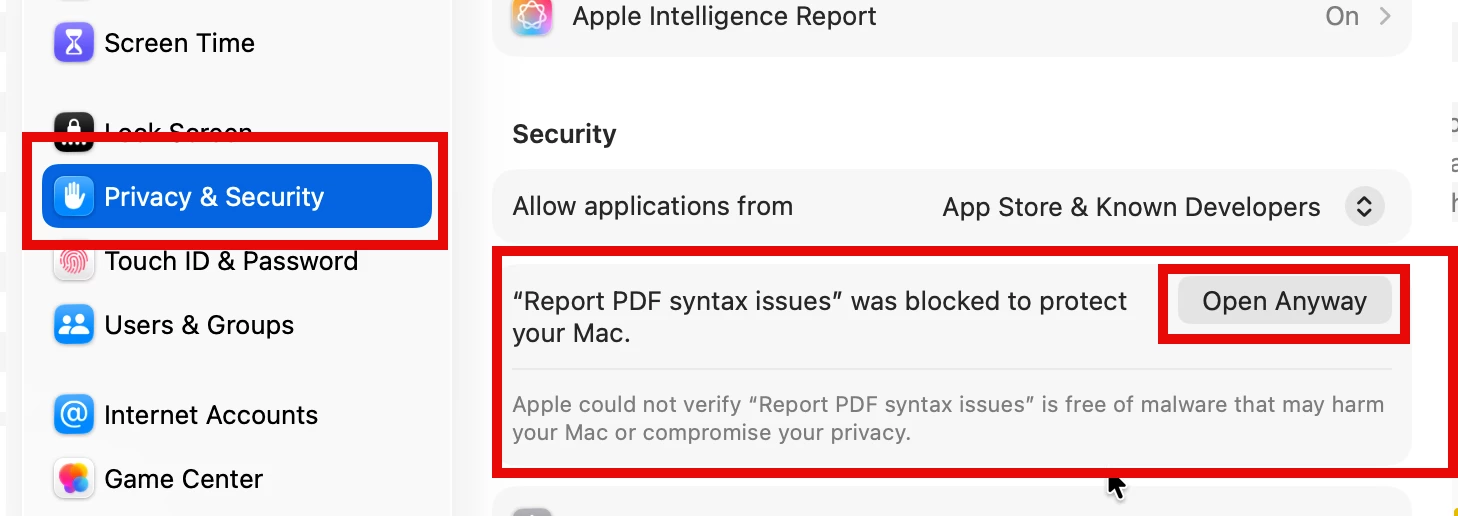
    After you get this message, open up our macOS system preferences and go to Privacy & Security - then scroll down until you see the following under security:


    When you now click on “Open Anyway” and confirm again and enter your admin password, the droplet should work. 

    1 reply

    Karl Heinz  Kremer
    Community Expert
    Karl Heinz KremerCommunity ExpertCorrect answer
    Community Expert
    March 24, 2026

    After you get this message, open up our macOS system preferences and go to Privacy & Security - then scroll down until you see the following under security:


    When you now click on “Open Anyway” and confirm again and enter your admin password, the droplet should work.