
Participant
November 12, 2021
Question

Dynamic Stamps Counter

  • November 12, 2021
  • 2 replies
  • 604 views

Hi,


i am using Acrobat Pro 10 and made a auto- incrementing Stamp using 2 stamps. The first One is for Inputing the first Nummer. The other one is for adding 1 to the Nummer ever time it gets stamp. It works well.

Ist there a way just using one Stamp ? Maybe if as long a Key is not press down, it keeps Counting up every time it gets stamp and after pressing a key it asks for the next Nummer? 


Hier is the code:
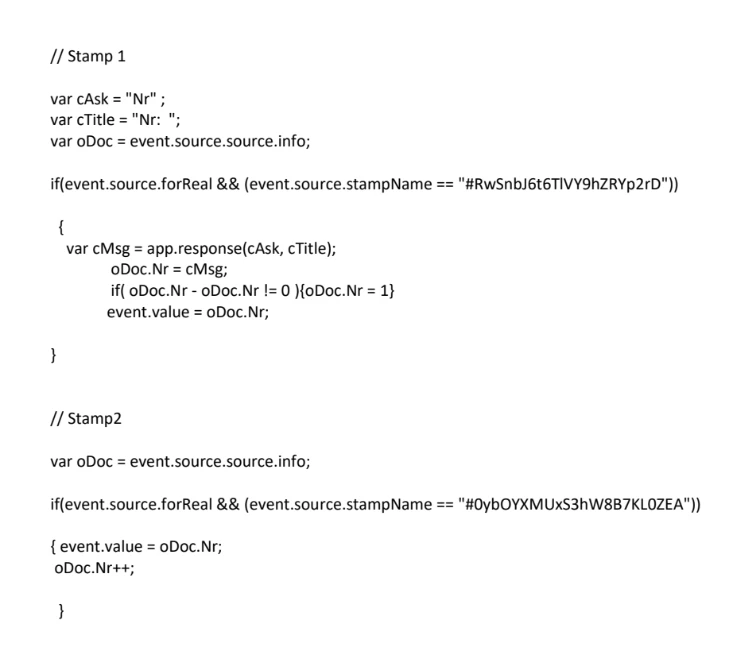
This topic has been closed for replies.

2 replies

Thom Parker
Community Expert
Community Expert
November 13, 2021

All you need is a way to initialize the increment number. Right now you're using a stamp to do it, cause it is one way to display a dialog, but there are other ways to initialize the number. 


1. Automatically set to zero when the document variable is not set.

2. Use the console window to run a line of code to set the number.

3. Write a folder level script that's activated from a menu item or toolbar button.

4. Write a JavaScript "Command" to do it. You'll find the commands on the "Action Wizard" toolset


BTW. The doc info is only writeable in Acrobat Pro. So if this stamp is used in Reader, it won't work. 


Thom Parker - Software Developer at PDFScriptingUse the Acrobat JavaScript Reference early and often
try67
Community Expert
Community Expert
November 12, 2021

Just move the line that increments the value of oDoc.Nr to the first code...


PS. In the future please do not post code as an image.