
Participating Frequently
August 6, 2024
Question

E-sign and comments not working

  • August 6, 2024
  • 2 replies
  • 818 views

I use acrobat daily and the latest updates have been driving me mental. E-sign now just freezes my machine. i've found the only way to use this feature is to upload to Acrobat in browser, as it works fine online.

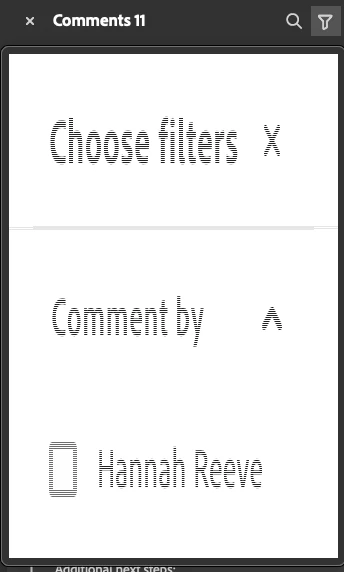
But now I have a bigger issue. When working on a job with a lot of comments I will use the checkbox to tick them off and then filter them to hide the checked ones. Opened Acrobat today to do a job with 30+ comments and the filter just doesn't work any more Its all glitchy. If anyone has had this and found a fix - please let me know. see Screen shot of what I get.


This topic has been closed for replies.

2 replies

Legend
September 18, 2024

Hi @SamBastion @grooveva,


Sorry for the delayed response and the troubled experience.

I understand how frustrating it can be when you’re unable to work effectively. We truly appreciate you bringing this to our attention and sharing your experiences.

Please know that we are fully committed to addressing issues like this and ensuring that the app functions smoothly for all users. Your feedback is invaluable in helping us improve, and we’re actively working to resolve this problem.


You may try updating Acrobat to the latest version: https://helpx.adobe.com/acrobat/release-note/release-notes-acrobat-reader.html. Launch Acrobat> Help Menu> "Check for Updates" to check for the latest update on your machine.


If the issue is still reproducible, please help us with the following information:

  • Operating system name and version
  • Acrobat version installed on your machine. 
  • Exact steps you are taking which are leading to the trouble.
  • Screenshot of the problem or a video. 


Thank you for your patience and support.


~Tariq

Participating Frequently
August 6, 2024

!!!UPDATE!!!
I've just turned off the new AI feature and it's back to working again. For how long who knows!

Close any open files. Then, navigate to Preferences > Generative AI. To turn off the generative AI features, deselect Enable generative AI features in Acrobat, and then select OK.

grooveva
Participant
August 12, 2024

turning off Generative AI did not fix this for me. Anyone else find a solve?

Participating Frequently
August 12, 2024

@grooveva I have to admit it only worked for a day for me too after I posted. I've gone back to using old acrobat until its fixed. Go to View>Disable new acrobat. It wil then restart in the old version which seems to work OK