Participant
April 28, 2023
Answered

Edit number

  • April 28, 2023
  • 1 reply
  • 2277 views

When I try to edit a number from a 2 to a 1, the 1 appears in a different font?



This topic has been closed for replies.
Correct answer Zaid Al Hilali

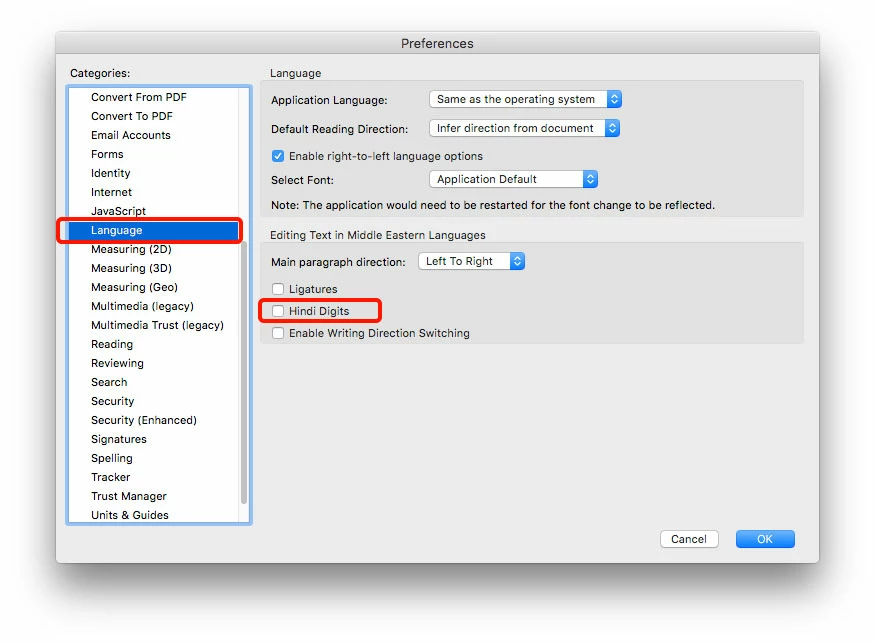
In Acrobat's Preferences, turn off Hindi Digits as illustrated below
1 reply

Meenakshi Negi
Community Manager
Community Manager
April 28, 2023

Hi Forkinhades,


Thank you for reaching out.


This generally happens when the file's font is unavailable on the machine. It picks up the most similar font to add the text when you edit the PDF in Acrobat.

Would you mind sharing the file so we can check and confirm the same?


Thanks,

Meenakshi

Participant
April 29, 2023

Indeed sir, see attached file.

It looks an arabic font for the numbers, but the letters are the same.  see attached

Zaid Al Hilali
Community Expert
Zaid Al HilaliCommunity ExpertCorrect answer
Community Expert
May 2, 2023

In Acrobat's Preferences, turn off Hindi Digits as illustrated below