Participating Frequently
November 20, 2023
Question

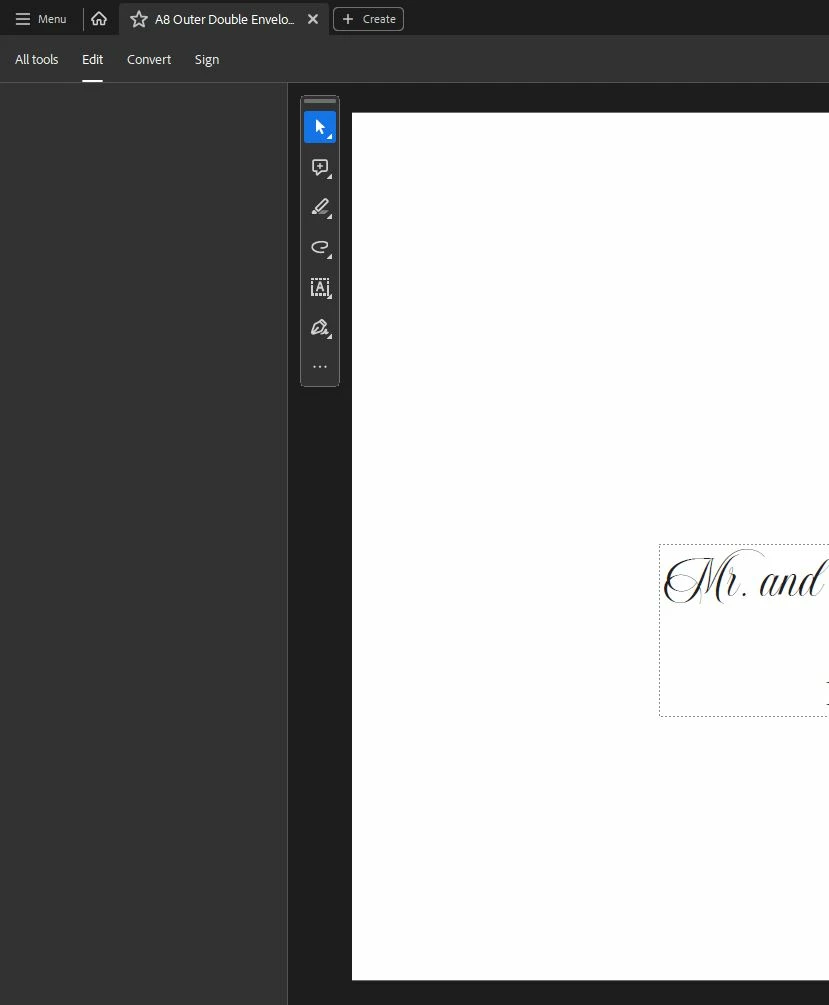
Edit Options Missing (image attached)

  • November 20, 2023
  • 3 replies
  • 2278 views

My Edit Options are missing from the side panel, not sure how to fix this. I cannot Edit text, change text font, anything like that. Please help. 

Version 2023.006.20380
 

This topic has been closed for replies.

3 replies

Participant
June 10, 2024

Confirming that I have the same issue, but not just with the "Edit" panel. Regardless of what link I click in the men u (Edit, Prepare Form, etc) the options panel is blank. Given the cost of this software, it's disappointing to see community experts say things like "There is a long-standing bug that apparently has not been fixed yet". Why does the software cost so much if nobody at Adobe seems to be doing anything about the problems faced by customers? This is now the second issue I've run into where nobody seems to have a sensible answer.

Community Manager
November 21, 2023

Thanks for letting me know, @gary_sc !

@jaimek99410139, we are sorry for the trouble. Since the suggestion by @gary_sc  didn't work for you. 
Would you mind sharing the Process Monitor logs: https://www.adobe.com/devnet-docs/acrobatetk/tools/Labs/acromonitor.html. The link has the details, and let me know if you are having any trouble using this tool. Also, please use "Advance logging," as stated in the list of instructions on the link.


There are two ways to share the logs with us:

  1.  Share directly with us using the same Tool: Choose an option on the screen share logs, and use your email ID. Once that is done, the logs will get uploaded to us, and share the unique Alpha-numeric number from the screen.
  2. The other method is listed on the link. Once the logs are available, you can use any Cloud drive(Google Drive, One Drive, etc..) to upload the logs to the storage and share the link via Private message.

    Thanks,
    Tariq Ahmad
Participating Frequently
November 28, 2023
Dear technician,

My main concern is that the Adobe Acrobat Pro does nor run on Sonoma or Ventura, only on Monterey.

I have found the problem please scroll down to the CPU writing in blue below.
It seems that Adobe has put a limiter on the CPU that can be used. They would have to rewrite the program.


Date/Time: 2023-11-19 17:55:16.277 +0200
End time: 2023-11-19 17:57:56.843 +0200
OS Version: macOS 14.1.1 (Build 23B81)
Architecture: x86_64
Report Version: 44
Incident Identifier: 854060CB-551B-4741-90A2-6F0E4682B33E
Share With Devs: Yes

Data Source: Microstackshots
Shared Cache: 67C86F0B-DD40-3694-909D-52E210CBD5FA slid base address 0x7ff807134000, slide 0x7134000 (System Primary)

Command: AdobeAcrobat
Path: /Applications/Adobe Acrobat DC/Adobe Acrobat.app/Contents/MacOS/AdobeAcrobat
Identifier: com.adobe.Acrobat.Pro
Version: 23.006.20360 (23.006.20360)
Team ID: JQ525L2MZD
Is First Party: No
Resource Coalition ID: 2123
Architecture: x86_64
Parent: UNKNOWN [1]
PID: 2202

Event: cpu usage
Action taken: none
CPU: 90 seconds cpu time over 161 seconds (56% cpu average), exceeding limit of 50% cpu over 180 seconds
CPU limit: 90s
Limit duration: 180s
CPU used: 90s
CPU duration: 161s
Duration: 160.57s
Duration Sampled: 110.98s
Steps: 28

Hardware model: iMac11,3
Active cpus: 8
HW page size: 4096
VM page size: 4096
Boot args: keepsyms=1 debug=0x100 -lilubetaall -btlfxallowanyaddr ipc_control_port_options=0 -nokcmismatchpanic
gary_sc
Community Expert
Community Expert
November 28, 2023

Hi, @Stephen218626543e9s, I will let the engineers at Adobe deal in greater detail, but I do want to let you know that (1) the blue did not copy after pasting into the forum thread, so whichever line you wish for the engineers to focus on, it's probably better to manually copy and paste that above the string and put that in quotation marks.


The other issue (2) while I'm not on Sonoma myself, I do understand it works on Sonoma, and it does run just fine on Ventura (my current OS). Why it doesn't run on your computer is a mystery to me.


Oh, for the record, I'm on a Mac Studio (M1). I'm not sure which model your iMac is, but for the record, what year did you purchase it?


Good luck!

gary_sc
Community Expert
Community Expert
November 20, 2023

This is going to sound weird but quit Acrobat. Then restart and, count to 10, then click the Edit panel. There is a long-standing bug that apparently has not been fixed yet, and if you click on Edit too soon, this happens. 


It seems that Adobe doesn't think we should be doing things too fast?

Let us know if this works.

Participating Frequently
November 20, 2023

Thank you for the quick response. This does not work for me.
