Participant
April 10, 2024
Question

Edit the Quick Action Toolbar

  • April 10, 2024
  • 3 replies
  • 1040 views

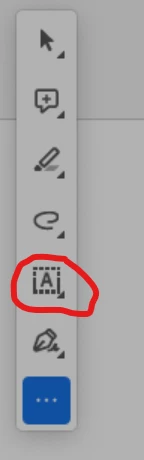
What is the tool with the "A" and the dotted box around it called and how do I add it to my quick action toolbar?

Thanks.
This topic has been closed for replies.

3 replies

Participant
May 30, 2024

I saw on another forum that if you print as pdf the form, then it is fixed. 


See if you can open this link, https://www.reddit.com/r/Acrobat/comments/198caxc/why_does_the_fill_in_form_fields_option_on_the/

Amal.
Community Manager
Community Manager
April 10, 2024

Hi @Devyn36647420nuoh 


++ Adding to the discussion


What is the version of the Acrobat DC you are using? To check the version go to Help > About Acrobat and make sure you have the recent version 24.01.20643 installed. Go to Help > Check for updates and reboot the computer once.

Also try to repair the installation from the help menu (Win Only) and see if that works.


If it still doesn't work: please remove the application using the Acrobat cleaner tool https://www.adobe.com/devnet-docs/acrobatetk/tools/Labs/cleaner.html , reboot the computer and reinstall the application using the direct link https://helpx.adobe.com/acrobat/kb/acrobat-dc-downloads.html and check


~Amal


Got your issue resolved? Please label the response as 'Correct Answer' to help your fellow community members find a solution to similar problems.

Participant
April 16, 2024

Hi Amal,


the version on my conputer is 2024.002.20687 and after installing the cleaner tool, rebooting and reinstalling using the direct link, I still dont have the "Fill in the form fields" option. 


I am currently in Germany and still downloaded the link sent and stayed on that region when downloading. Now my Acrobat is still the same version before cleaning and reinstalling, but I have an 3 dot symbol that says I can "customize symbol list" but I takes me to the paid pro version and I still can not all the "Fill in the form fields" tool. I have the "Fill in the form fields" on a seperate computer that is also on the free version of Acrobat.

Amal.
Community Manager
Community Manager
April 16, 2024

Hi there

We are sorry to hear that the issue still persists, Would you mind collecting the Adobe CC logs https://helpx.adobe.com/creative-cloud/kb/cc-log-collector.html , Procmon logs (Win Only) https://www.adobe.com/devnet-docs/acrobatetk/tools/Labs/acromonitor.html and share them via any cloud storage. Just upload the log file to the cloud and generate the link and share that link with us for further investigation.

Regards
Amal

ls_rbls
Community Expert
Community Expert
April 10, 2024

Hi @Devyn36647420nuoh ,


That is the Fill & Sign tool; a tooltip is displayed as "Fill in the form fields" when you hover the mouse pointer over that icon for about a second or so. 


If you are missing it, it is possible that you need to apply some of the most recent updates or optional updates.