talime
Participating Frequently
January 2, 2019
Answered

edit the text itself in the tag panel?

  • January 2, 2019
  • 2 replies
  • 979 views

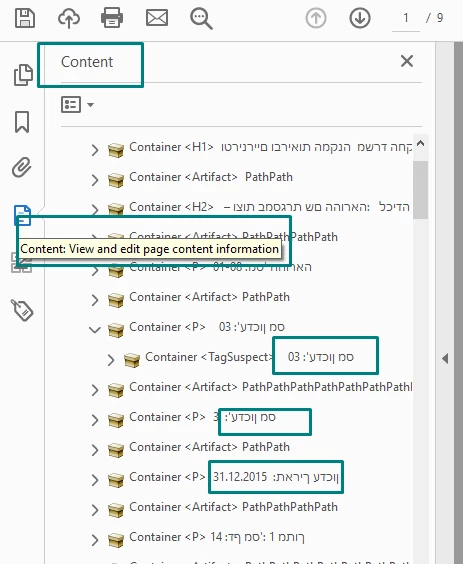
please see the image ,,,,can I edit (and how:) the text in the  "CONTENT section" in the TAG panel? thank you.
This topic has been closed for replies.
Correct answer hammer0909

No you cannot edit text from the Tags panel. You can however edit the text using the Edit PDF tool and those changes should be reflected in the Tags pane.

2 replies

Bevi Chagnon - PubCom.com
Legend
January 17, 2019

CAUTION:

Although you can edit text content with Acrobat's Edit PDF tool, this will "break" your tags and accessibility.

It's a known bug in Acrobat that I hope will be corrected by Adobe.

But for the time being, DO NOT EDIT TEXT IN ACROBAT if the PDF is already tagged for accessibility. The editing process itself changes the content structure of the PDF, mis-tags items that are already tagged, and basically ruins the accessibility.

And you might not see the difference from just looking at the PDF. An editorial change on page 1, for example, can botch the structure and tags on page 99.

DO NOT EDIT TEXT IN ACROBAT.

The best solution (and only viable solution) is to go back to the source document (Word, PowerPoint, Adobe InDesign, etc.), make the editorial changes there, and re-export to PDF.

If your source document is constructed well and is accessible, then there shouldn't be much work to do the edits there and re-PDF it.

|    Bevi Chagnon   |  Designer, Trainer, & Technologist for Accessible Documents ||    PubCom |    Classes & Books for Accessible InDesign, PDFs & MS Office |
hammer0909
Community Expert
hammer0909Community ExpertCorrect answer
Community Expert
January 3, 2019

No you cannot edit text from the Tags panel. You can however edit the text using the Edit PDF tool and those changes should be reflected in the Tags pane.