August 24, 2018
Answered

Editable PDF to display full date

  • August 24, 2018
  • 3 replies
  • 3475 views

I'm working on editable PDF, and I have date field where I went to populate the date in the following format;

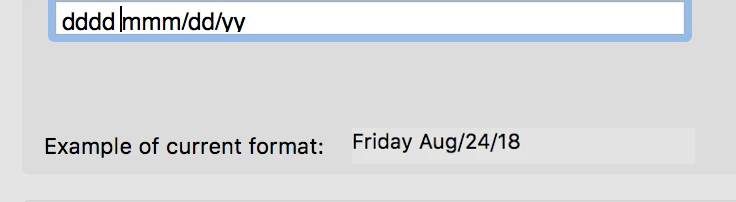
dddd mmm/dd/yy.   Friday Aug/24/18.

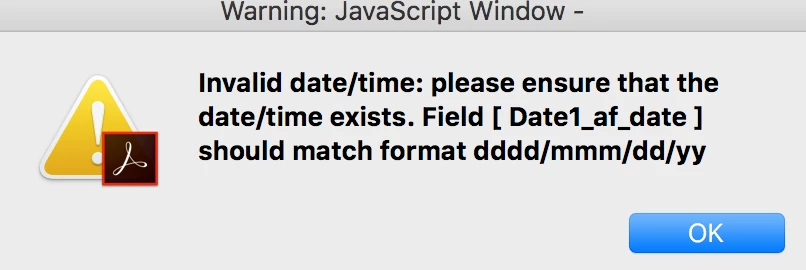
I need it to display the day of week, I have tried amending the date options below but the date field refuses to play ball, keeps throwing all sorts of errors?

I don't know what I'm doing wrong, can anybody help?
This topic has been closed for replies.
Correct answer CaminoCam

This code inserts creates a string with a full date in one months time  in Spanish

var meses = new Array ("Enero","Febrero","Marzo","Abril","Mayo","Junio","Julio","Agosto","Septiembre","Octubre","Noviembre","Diciembre");

var diasSemana = new Array("Domingo","Lunes","Martes","Miércoles","Jueves","Viernes","Sábado");

var d=new Date();

var f = new Date(d.getFullYear(), d.getMonth()+1,d.getDate());

if(!this.getField("Validez").readonly) {

this.getField("Validez").value = diasSemana[f.getDay()] + ", " + f.getDate() + " de " + meses[f.getMonth()] + " de " + f.getFullYear();}

It should be useful. I have it in Document Javascripts

3 replies

CaminoCam
Inspiring
September 22, 2018

I am an old style hacker.  I love ugly hacks. My priority is that it works. I do not care about anything else. I am a damn good programmer and my code actually is maintainable but my only care is that it works.  I never touch what works .

August 24, 2018

To clarify this is sentence below extracted from the PDF. Each of the Friday Aug/24/18 blocks shown should be a calendar drop-down that user can select the date from and then it be displayed in the format above. How do I do that? How do I make that work.

n8HdTU

CaminoCam
CaminoCamCorrect answer
Inspiring
August 24, 2018

This code inserts creates a string with a full date in one months time  in Spanish

var meses = new Array ("Enero","Febrero","Marzo","Abril","Mayo","Junio","Julio","Agosto","Septiembre","Octubre","Noviembre","Diciembre");

var diasSemana = new Array("Domingo","Lunes","Martes","Miércoles","Jueves","Viernes","Sábado");

var d=new Date();

var f = new Date(d.getFullYear(), d.getMonth()+1,d.getDate());

if(!this.getField("Validez").readonly) {

this.getField("Validez").value = diasSemana[f.getDay()] + ", " + f.getDate() + " de " + meses[f.getMonth()] + " de " + f.getFullYear();}

It should be useful. I have it in Document Javascripts

try67
Community Expert
Community Expert
August 24, 2018

If you select that Format then you also have to enter a value that follows it... What exactly are you entering into the field?

try67
Community Expert
Community Expert
August 24, 2018

I used that format and entered "24/8/18" and it worked fine, because that is a standard date format...

Participant
August 24, 2018

If you enter dddd mmmm dd,yyyy into the custom field on the format tab, it shows at Week Day Month day, year.