StlSims1
Participant
January 5, 2018
Answered

Editing a Rubric

  • January 5, 2018
  • 1 reply
  • 673 views

My apologies if this has been asked before - I was unable to find the answer.

I have a rubric (PDF) and would like to have the option to select the entire box, instead of a single radio button.  Is this something I can do?  The rubric looks like this:

I would like to have selection color in the entire box like this online rubric from our LMS:

There does not need to be any numeric weights for the selections - it does not have to be that type of rubric.
This topic has been closed for replies.
Correct answer Adorobat

Hi StlSims1,

Sorry for the delay in response.

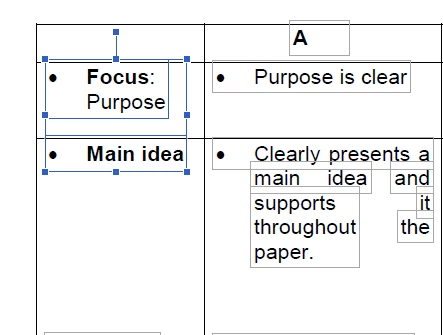
You may try "Edit PDF" option in Adobe Acrobat using which you can select multiple text boxes by holding down "Ctrl" key and selecting text boxes using left click.

Below is the screenshot of multiple text boxes selected in Adobe Acrobat:

But I am afraid you won't be able to add colors in text boxes in "Edit PDF" mode. You may visit following forum thread which discusses the similar topic :change textbox background color 

Feel free to update this discussion if you have any further questions.

Shivam

1 reply

Adorobat
AdorobatCorrect answer
Participating Frequently
April 5, 2018

Hi StlSims1,

Sorry for the delay in response.

You may try "Edit PDF" option in Adobe Acrobat using which you can select multiple text boxes by holding down "Ctrl" key and selecting text boxes using left click.

Below is the screenshot of multiple text boxes selected in Adobe Acrobat:

But I am afraid you won't be able to add colors in text boxes in "Edit PDF" mode. You may visit following forum thread which discusses the similar topic :change textbox background color 

Feel free to update this discussion if you have any further questions.

Shivam