This topic has been closed for replies.
Correct answer Bernd Alheit

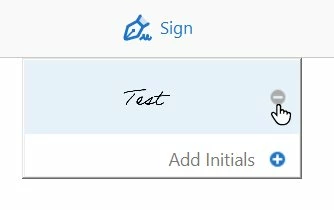
Mouse click on the minus sign:

2 replies

Bernd Alheit
Community Expert
Bernd AlheitCommunity ExpertCorrect answer
Community Expert
May 30, 2018

Mouse click on the minus sign:

Participant
June 22, 2020

This doesn't work.  Clicking the minus button does nothing.  It's always gray and does not react to a click.  I hate the signatures I've set up and I'm trying to delete them as well.  None of these solutions works.  Looks like you have one shot at getting the one you want otherwise you are stuck forever.

Participant
March 26, 2021

Same thing here.  Grayed out!

Adorobat
Participating Frequently
May 29, 2018

Hi NickR83,

Sorry for the delay in response.

As per the issue description mentioned above, you want to clear the information filled under Fill & Sign, is that correct?

You can clear the saved information by clicking settings > My profile. Check the box clear all under My profile. You may refer to this help document for the same: Using Acrobat Reader DC Fill & Sign

Let us know if you need any further help.

Shivam