
Editing text box deletes letters
Hello! I've been using Adobe Acrobat to convert web page forms into PDF forms - printing the pages in browser to save them as PDFs and then opening them in Acrobat and using the form creation tool. However, trying to make any edits to text boxes deletes every instance of the letters "fi" in sequence.
Before: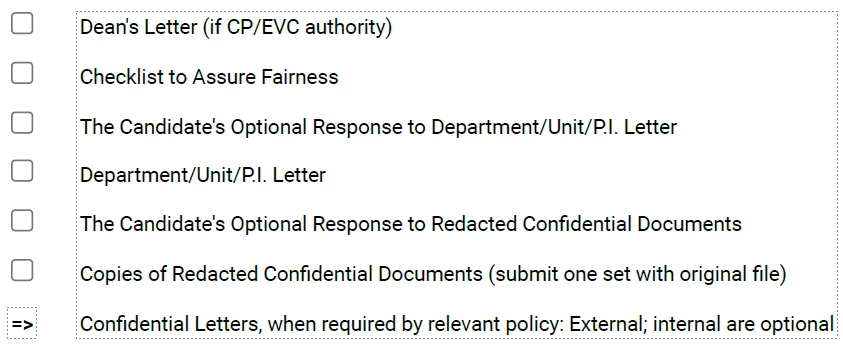 After (note le instead of file, con dential instead of confidential):
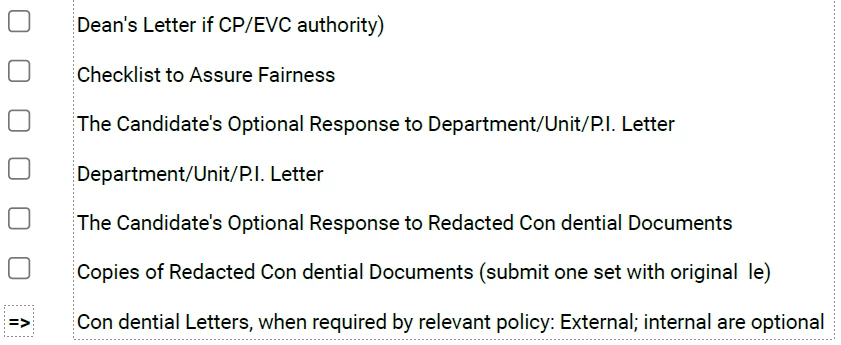 While trying to edit the read order of the text, I've also noticed that even if I don't touch the text boxes, "fi" is not recognized as text by the program, so it reads out "original le" even if the text displays as "original file".
Editing text boxes also changes the spacing and alignment of all text in the box, though I recognize that may be an unavoidable part of the conversion. Still, if there's a way to circumvent this, it would be very helpful!
 AdChoices