
Participating Frequently
May 4, 2017
Answered

Editor default font to Helvetica , not installed

  • May 4, 2017
  • 3 replies
  • 31177 views

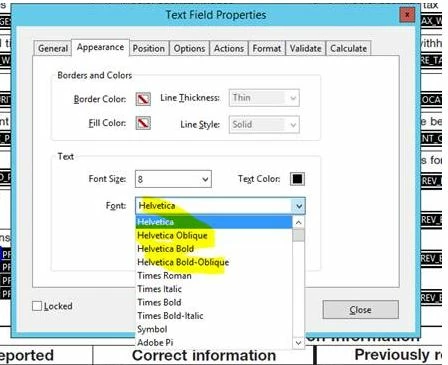
I am using Acrobat DC Pro XI and when I go to edit the PDF text field, the default font is "Helvetica". This font is not installed on the current system, and Helvetica is not a font but a font family. I can either purchase a font named "Helvetica" , but everywhere I have looked i see fonts within the "Helvetica family" and NOT the "Helvetica" font ONLY. Another solution is to change the default font or default settings to Arial, but I have hundreds of these fields and hundreds of these templates to modify.
This topic has been closed for replies.
Correct answer Karl Heinz Kremer

There is no need to purchase the "Helvetica" font, nor is there a need to change every occurrence of "Helvetica" to "Arial". The "Base 14" fonts (Helvetica, Times Roman and Courier in four different weights plus Symbol and Zapf Dingbats) (or their Windows equivalents) are required to be available in every PDF processor. When you open a file that uses Helvetica on a Windows system that only has Arial installed, it will automatically substitute Arial for Helvetica. This means that even though you don't have "Helvetica" installed on your computer, your form that uses "Helvetica" as the font for form fields will work without any problems.

3 replies

Participant
April 13, 2022

What if it is not automatically substituting Arial for Helvetica? When trying to open a specific pdf, I keep getting the meesage " Cannot find or create the font "Helvetica". Some characters may not display or print correctly."  And the file then comes up blank. I can go to Preflight and manually have Adobe substitute the font, but how do I get it to do it automatically? 

Legend
May 5, 2017

Type 1 is one of the three common font types. That's the description you need to find in a catalog instead of TrueType or OpenTpe. But you also need to check with the makers of your software that they accept this font and font type and will embed it. Don't assume, all software is different.

mayureshAuthor
Participating Frequently
May 5, 2017

Thanks both for your suggestions. I am pursuing the route of contacting with the software maker. Will send an update in few days.

Karl Heinz  Kremer
Community Expert
Karl Heinz KremerCommunity ExpertCorrect answer
Community Expert
May 4, 2017

There is no need to purchase the "Helvetica" font, nor is there a need to change every occurrence of "Helvetica" to "Arial". The "Base 14" fonts (Helvetica, Times Roman and Courier in four different weights plus Symbol and Zapf Dingbats) (or their Windows equivalents) are required to be available in every PDF processor. When you open a file that uses Helvetica on a Windows system that only has Arial installed, it will automatically substitute Arial for Helvetica. This means that even though you don't have "Helvetica" installed on your computer, your form that uses "Helvetica" as the font for form fields will work without any problems.

mayureshAuthor
Participating Frequently
May 4, 2017

Thanks for replying. Issue we are facing is there is 3rd party tool that is creating Pdfs based on this master PDF template and it is looking for Helvetica font and does not understand to pick Arial instead. if there was a way to install just Helvetica font , we can venture that option. Else any other way ?

Karl Heinz  Kremer
Community Expert
Community Expert
May 4, 2017

That is something you will have to discuss with the makers of this 3rd party tool. As far as purchasing "just" Helvetica, you may need to talk to one of the font vendors. I did a quick check on Helvetica® Roman Font - Licensing Options | Linotype.com​ to see if any of the fonts report just a "Helvetica" as their PostScript name, but that does not seem to be the case.

Does your 3rd party tool run on a Mac? Every Mac comes with Helvetica, so you would not have the Helvetica/Arial substitution problem.