


Inspiring
Jan 16, 2025 7:08 PM UTC
Question

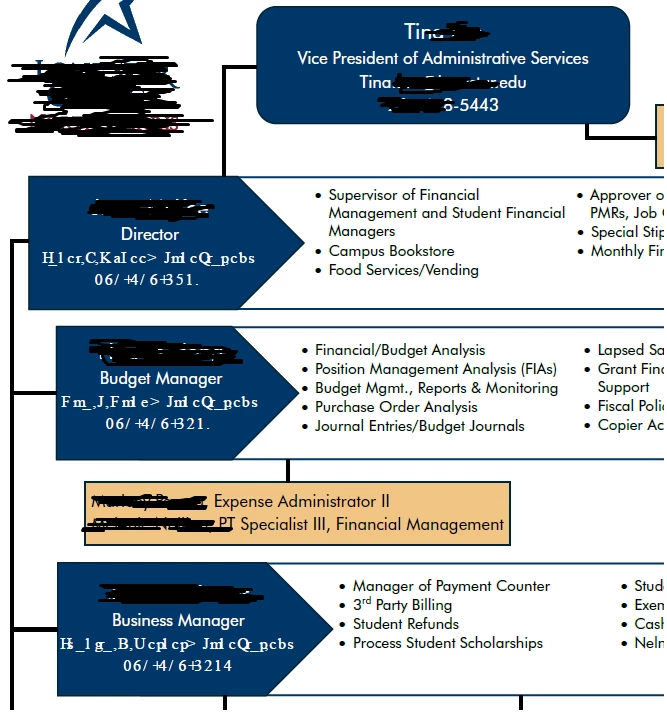
Email addresses and phone numbers incorrect after saving to PDF

When I convert this document to PDF the email addresses and phone numbers change into a series of incoherent numbers and symbols. As you can see on the attached image, this does not happen on all of the emails and phone numbers. I do not think its Arabic assist or Hindu digits as it's not happening throughout the document. I have ungrouped the elements on the original document and taken off the email hyperlinks. That did not fix the issue.
4 replies

Eric Dumas
Community Expert
Community Expert
Jan 17, 2025 9:29 AM UTC

Can you share a screenshot of: File > Properties > Fonts tab

Translate
Inspiring
Jan 23, 2025 3:53 PM UTC

Hopefully, my response to the responder above answers your request. Changing from 10.5 font size to 11 solved the issue.

Translate
Souvik Sadhu
Legend
Jan 17, 2025 7:49 AM UTC

Hi @melanie_4173,


Hope you are doing well. Sorry for the trouble.


This looks like an issue with the fonts embedding in the file. 


Would you mind sharing the file with us for further investigation and assistance?


-Souvik

Translate
Inspiring
Jan 23, 2025 3:50 PM UTC

It turns out that this font, Futura, cannot be done in half increments, i.e.. 10.5, on the original document and then converted to PDF.  As soon as I made the font size 11 on the original, the problem was corrected. It is one of the prefered fonts per our styleguide but is not included initially with Adobe. That could be why it must be in full sizes.

Translate