Participant
March 17, 2020
Answered

emailing pdf that requires filling in information and signature

  • March 17, 2020
  • 2 replies
  • 1074 views

I have a fillable form that I would like to email to clients to be filled out and signed. Using Acrobat Pro DC I cannot figure out how to send the file so that it retains the ability to be filled out by the client. When I use fill in and sign, the form only allows the client to sign. 


What am I missing or doing wrong? 


Need help!
This topic has been closed for replies.
Correct answer Meenakshi_Negi

Hi there,


Yes, you can save the template with form fields in the document. 

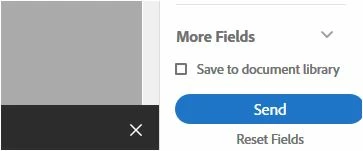
On the page where you add form field to the document, there is an option to save the document library.

You can save the document with the added form fields to library and then send it for signature. Check the screenshot below:


Hope that's wat you are looking for.

Let us know if that helps.


Regards,

Meenakshi


2 replies

Meenakshi_Negi
Legend
March 18, 2020

Hi there,


If you are using the Adobe Acrobat DC, you can send the document for signature using the steps provided in the following help link: https://helpx.adobe.com/in/acrobat/using/send-for-signature.html

Please ensure that you add the form fields that need to be filled by the signers along with the signature field.


Let us know if you experience any issue or need any help.


Regards,

Meenakshi

Participant
March 18, 2020

Thank you Meenakshi. I finally got it. Had to go to the original pdf and follow the fill-in and sign instructions and all worked out. The line about adding the form fields that need to be filled out really helped. 


Is there any way to set up a fillable pdf template that I can simply add the sign fields or do I have to add the form fields every time? 

Meenakshi_Negi
Meenakshi_NegiCorrect answer
Legend
March 25, 2020

Hi there,


Yes, you can save the template with form fields in the document. 

On the page where you add form field to the document, there is an option to save the document library.

You can save the document with the added form fields to library and then send it for signature. Check the screenshot below:


Hope that's wat you are looking for.

Let us know if that helps.


Regards,

Meenakshi


try67
Community Expert
Community Expert
March 17, 2020

Just email it as a normal attachment and instruct them to open it in Adobe Reader.

Participant
March 18, 2020

thank you.


Will try this now.