


Participant
November 9, 2025
Answered

"Enable Auto Adjust Layout by default" setting missing.

  • November 9, 2025
  • 1 reply
  • 215 views

Hi,


I am working with a user who is missing the "Enable auto adjust layout by default" setting in Preferences > Content Editing per the picture below. The user is using the new Acrobat UI and is on the most up to date version of Acrobat (25.001.20844)
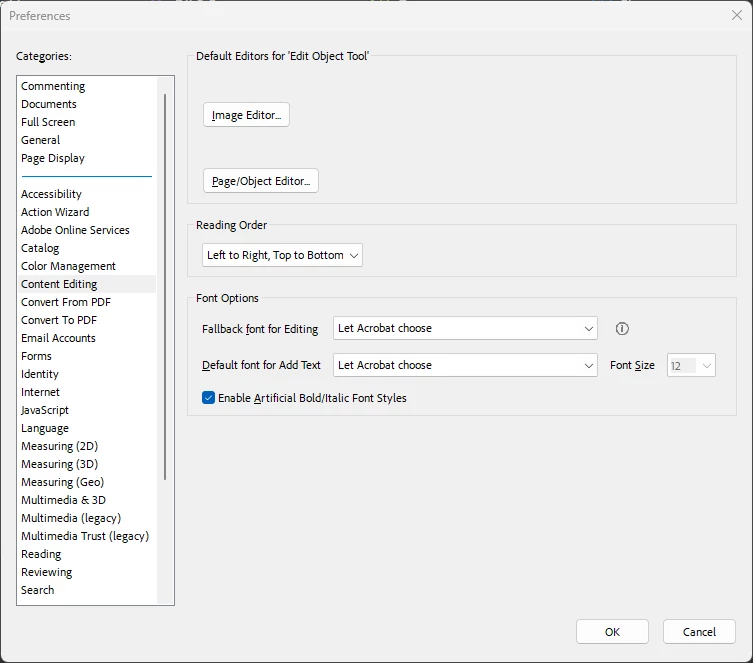
 

This user wants all PDF's that are opened to automatically switch to Landscape view instead of portrait view. Am I going on the right track to getting this working, or is there some other way to do this? If I am, how do I get that setting to appear in the Content Editing settings?


Thank you.

Correct answer creative explorer

@richard.stahl unfortunately, there is no global preference in Acrobat that forces all PDFs to open in Landscape view, because Acrobat is designed to respect the orientation saved in the file itself. If someone creates a PDF that is 8.5" x 11" (portrait mode), Acrobat will open that document in portrait mode not landscape. You could set the default page view to maximize the landscape appearance for pages that are already in a landscape format, or you can temporarily rotate the view. While this does not force a rotation to Landscape, it optimizes the default page layout to better fit wide documents, which achieves the desired visual result for the user. To implement this setting, first open Acrobat or Acrobat Reader, then navigate to Edit > Preferences (or press $Ctrl+K$). In the Preferences window, select Page Display from the Categories list. Within the Default Layout and Zoom section, configure the Page Layout to either Single Page Continuous or Single Page, and set the Zoom level to either Fit Page or Fit Width before clicking OK.

1 reply

creative explorer
Community Expert
creative explorerCommunity ExpertCorrect answer
Community Expert
November 11, 2025

@richard.stahl unfortunately, there is no global preference in Acrobat that forces all PDFs to open in Landscape view, because Acrobat is designed to respect the orientation saved in the file itself. If someone creates a PDF that is 8.5" x 11" (portrait mode), Acrobat will open that document in portrait mode not landscape. You could set the default page view to maximize the landscape appearance for pages that are already in a landscape format, or you can temporarily rotate the view. While this does not force a rotation to Landscape, it optimizes the default page layout to better fit wide documents, which achieves the desired visual result for the user. To implement this setting, first open Acrobat or Acrobat Reader, then navigate to Edit > Preferences (or press $Ctrl+K$). In the Preferences window, select Page Display from the Categories list. Within the Default Layout and Zoom section, configure the Page Layout to either Single Page Continuous or Single Page, and set the Zoom level to either Fit Page or Fit Width before clicking OK.

m