
Participant
April 26, 2021
Question

Enable colour change of marked text in context menu

  • April 26, 2021
  • 3 replies
  • 1206 views

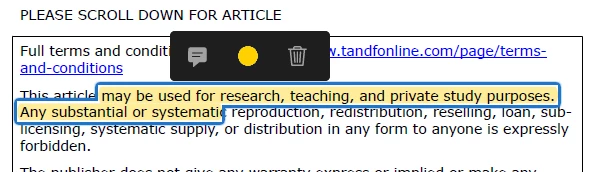
I just got an upgrade from adobe reader DC to Acrobat Pro. In DC I could easily change the colour of marked text in a context menu:
 

In Pro, I don't have the option to change the colour anymore:
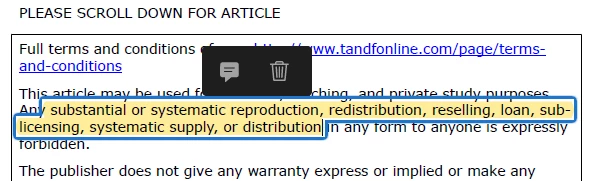
 

I don't know hot to change that since I don't even know how to call this feature.

Thanks to all the people who read this and are looking for a solution to my challenge.

Best regards and have a great day!

This topic has been closed for replies.

3 replies

JR Boulay
Community Expert
Community Expert
April 26, 2021

Here:


Acrobate du PDF, InDesigner et Photoshopographe
Participant
April 27, 2021

Thanks for your quick reply!


Your version does work as an alternative, but I look for this explicitly handy feature. I read plenty of texts for my studies and I enjoy this fast and easy colour chanage. That's why I want the color editor to appear in this mini-menu when I click on the highlightet text, like shown in the screenshot. Any thoughts on that?

CPAlexander17583891
Participating Frequently
April 26, 2021

It appears that you wish to change the color of the highlight, not the text itself.  You need to:

  1. Select the highlight.
  2. Right click to access the context sensitive pop up menu.
  3. Select Properties... to access the Highlight Properties dialog box.
  4. Select the Appearance tab.
  5. Select the Color: button and choose the desired color.
  6. Set Opacity as desired.
  7. Check the Make Properties Default box, if desired.
  8. Press the OK button to set the change(s).

BTW, I share in your consternation that Adobe doesn't preserve features between products or iterations of the same product.


Participant
April 27, 2021

Thanks for your quick reply!

Yes, you are right: I want to change the highlight.


Your version does work, but takes more time then the feature I have in DC. I read plenty of texts for my studies and I enjoy this fast and easy colour chanage. That's why I want the color editor to appear in this mini-menu when I click on the highlightet text, like shown in the screenshot. Any thoughts on that?

Bernd Alheit
Community Expert
Community Expert
April 26, 2021

What version of Adobe Acrobat does you use?

Participant
April 27, 2021

I use Adobe Acrobat Pro 2020