
Participant
July 25, 2025
Question

Enable Microsoft Purview Information Protection (MPIP) Sensitivity Labels for PDFs in Adobe Acrobat

  • July 25, 2025
  • 2 replies
  • 947 views

Hi everyone,


I'm trying to enable Microsoft Purview Information Protection (MPIP) sensitivity labels on PDFs in Adobe Acrobat, but I’m stuck at the admin setup step.

The official Microsoft documentation mentions steps to set this up “for admins”, but I can’t seem to access or view that specific part of the documentation. Link to the documentation :  https://helpx.adobe.com/enterprise/kb/mpip-support-acrobat.html
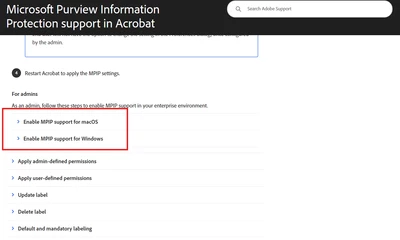
Has anyone successfully configured this in their environment or anyone is able to click on that section?

  • What are the admin steps required to enable MPIP support in Adobe Acrobat?

  • Is there a specific setting in Purview, Intune, or Azure AD that needs to be enabled?

Any guidance, prerequisites, or even screenshots of the required admin configuration would be greatly appreciated!

Thanks in advance.

2 replies

Community Manager
July 25, 2025

Hi @tee_wei_2755 & @Meenakshi Negi,

The help document was recently updated, and the issues have now been resolved.
Please try reaccessing it and let us know if it works for youhttps://helpx.adobe.com/enterprise/kb/mpip-support-acrobat.html.

Thanks, 

B.S

Participant
July 28, 2025

Hello,

What is this issue about when I tried to apply the MPIP labels? 


Thanks for helping again.

S_S
Community Manager
Community Manager
July 30, 2025

Hi @tee_wei_2755,


Thanks for the response.


From the screenshot, it looks like you are trying to set up the MPIP labels in Acrobat.


If yes, this screen will appear the first time you try to log in to your Microsoft account with the required permissions.


In your case, you would need to reach out to your IT admin so they can enable the label protection usability for you from the backend.


If you have done so, and still see the same screen, let us know, and we will investigate further.


Regards,
Souvik.

Meenakshi_Negi
Legend
July 25, 2025

Hi tee_wei_2755,


Thank you for reaching out and reporting this.


There seems to be an issue with the help document. We will get it checked and updated.

Once the document is updated, I will let you know.


We appreciate your patience.


Thanks,

Meenakshi