Participant
November 28, 2017
Answered

Enable "search and look up" tool in Acrobat Reader

  • November 28, 2017
  • 1 reply
  • 4311 views

Hello everyone,

Im new to Acrobat Reader and wanted to ask, if there is any possiblity to enable the search tool that normally appears in iOS, when you 3-Finger click some word.

I find that tool very helpful, especially in lectures, since it opens a small window with some explanation oder wikipedia article on the topic.

I could not find a way to enable it in the Reader (works out in other programms very well).

Thanks a lot for your help!

Nico
This topic has been closed for replies.
Correct answer Adorobat

Hi Nico,

Sorry for the delay in response.

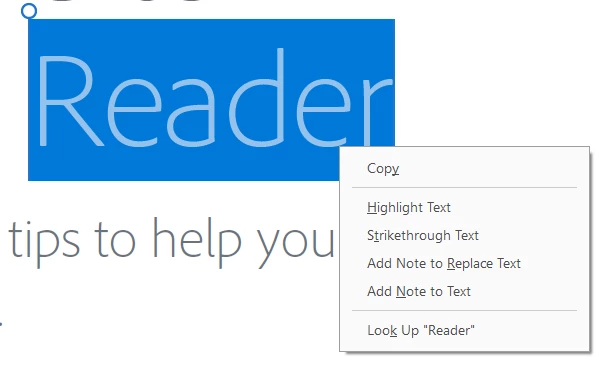
Have you tried selecting the word in the pdf by double-clicking on it > right-click > look up  'selected word'...... Below is the screenshot:

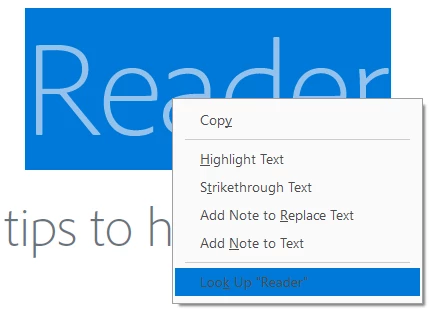
For touch-enabled devices, double-tap to select the word > then tap and hold the selected word to get look up option. Below is the screenshot:

Feel free to update this discussion if you need any further help.

Shivam

1 reply

Adorobat
AdorobatCorrect answer
Participating Frequently
December 26, 2017

Hi Nico,

Sorry for the delay in response.

Have you tried selecting the word in the pdf by double-clicking on it > right-click > look up  'selected word'...... Below is the screenshot:

For touch-enabled devices, double-tap to select the word > then tap and hold the selected word to get look up option. Below is the screenshot:

Feel free to update this discussion if you need any further help.

Shivam

Participant
October 16, 2020

In Adobe reader 2020.012.20048 version, when I right click on a word, there is no "look up" option in the menu. How can I search for the word? It would be really nice to access the dictionary with a 3-finger click in adobe reader as on other pages of iOS. Thanks in advance.