
Participant
November 7, 2023
Question

Enabling the New Experience

  • November 7, 2023
  • 1 reply
  • 438 views

Please help.


I cannot get my version of Adobe Acrobat to display the 'New Experience' layout.

I have the latest version installed (2023.006.20360) 

No further updates are available.

I have tried repairing the installation.

There is no option under the 'View' menu to activate:
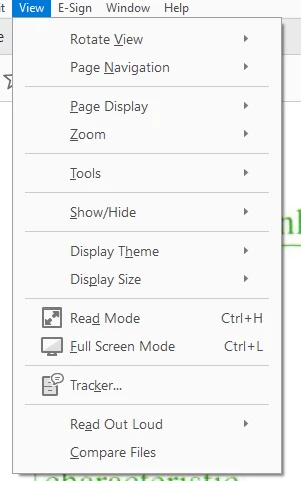
Any help would be appreciated.

Grant.


    This topic has been closed for replies.

    1 reply

    jane-e
    Community Expert
    Community Expert
    November 7, 2023


    @Grant33442862yaz5 


    Here is what should happen:


    Steps to enable [and disable] the new experience

    • To enable the new experience, go to View > Enable new Acrobat and click Restart.
    • To disable the new experience,
      • Windows: Click the hamburger menu ( 3 lines ) at the upper left corner and choose Disable new Acrobat.
      • macOS: Go to View > Disable new Acrobat.


    Details about the New Experience here:


    I've moved your post from Using the Community to Adobe Acrobat for you.


    Are you on macOS or Windows? Which version?


    Jane


    Participant
    November 8, 2023

    I am using Windows 11.

    I do not have any option under the 'view' menu to enable new experience.