
carolinem97446103
Participant
July 13, 2022
Answered

Enlever la couleur de champs texte par défaut dans le acrobat

  • July 13, 2022
  • 1 reply
  • 1008 views

Bonjour,


J'ai créé un formulaire basique avec des champs texte dans Indesign. Ces champs n'ont pas de couleur de fond.

Or, quand j'ouvre le PDF, un fond violet apparaît, il disparaît quand je clique pour remplir le champ, puis apparaît de nouveau.


Je ne sais pas si cela est dû à Indesign ou à acrobat.


Auriez-vous une idée pour régler le problème ?


Je vous remercie d'avance pour votre retour.
 

This topic has been closed for replies.
Correct answer Amal.

Hi there


Hope you are doing well and sorry to hear that.


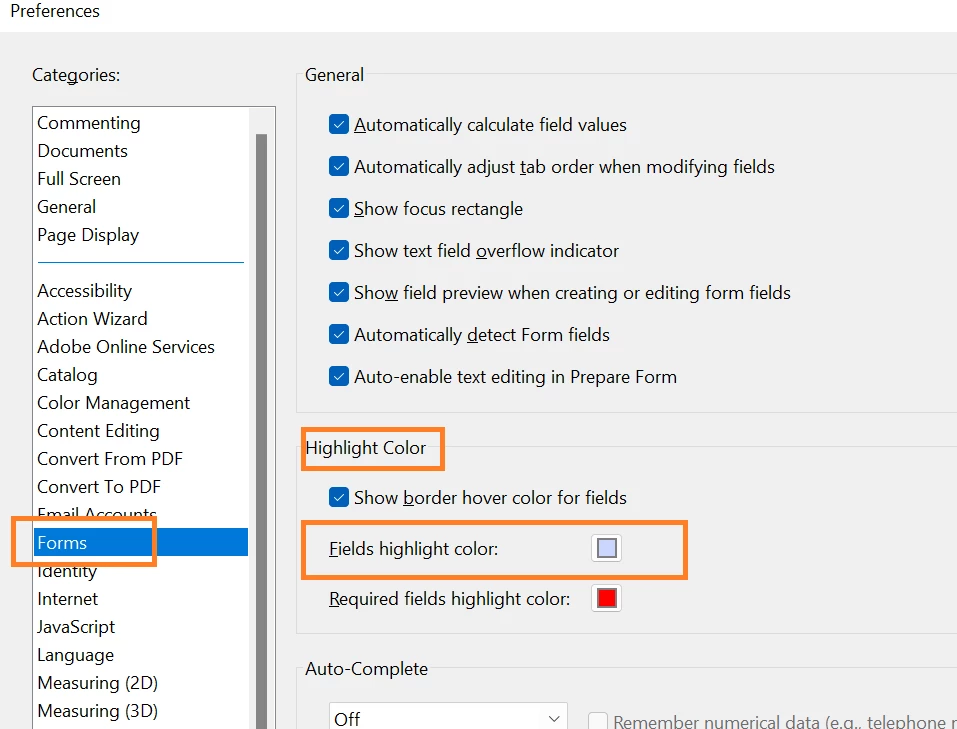
Please open the Acrobat DC and go to Edit > Preferences > Forms > Under Highlight Color, Change the filed highlight color as shown in the screenshot below:


Regards

Amal


1 reply

Amal.
Amal.Correct answer
Legend
July 13, 2022

Hi there


Hope you are doing well and sorry to hear that.


Please open the Acrobat DC and go to Edit > Preferences > Forms > Under Highlight Color, Change the filed highlight color as shown in the screenshot below:


Regards

Amal