Participating Frequently
Nov 19, 2021 5:51 PM UTC
Question

Erroneous bookmarks in PDF generated from MS Word

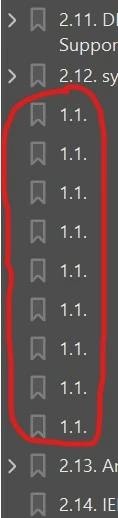
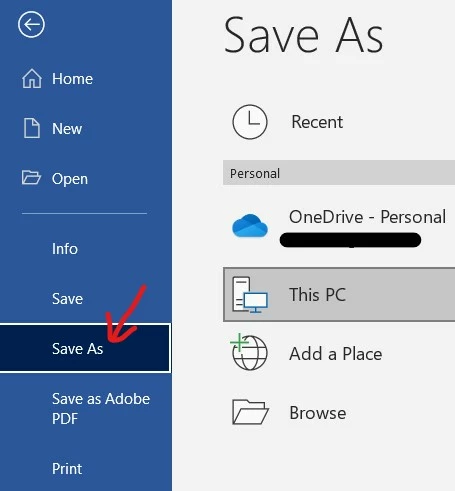
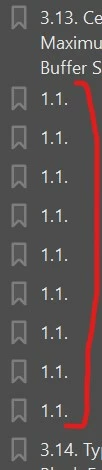
When I generate a PDF from MS Word via the "Save as" PDF method (not "Save As Adobe PDF"), I get additional erroneous bookmarks in the PDF which show up as "1.1." (as shown in the screenshots below) in some sections / chapters.
There does not seem to be a clear pattern to this occurence. There's also nothing visible in the MS Word docx that indicates a problem or errant hidden control/characters. There are internal / external hyperlinks in the content paragraph. But this problem does not show up in other sections which also have similar hyperlinks.


What could be causing this issue, and how can this be resolved? Thanks a lot.


MS Word: subscription desktop version MS 365 (version 2108, Build 14326.20404)

Adobe Acrobat Pro: subscription desktop version (latest version) 2021.007.20099

OS: Windows 10, Version 20H2, Build 19042.1348


Regards,

Friiscor

This topic is closed to new replies. Start a new post to keep the conversation going.

6 replies

Friis1587Author
Participating Frequently
Nov 29, 2021 11:10 AM UTC

After some "experiments", I found out that these errant bookmarks "1.1." were apparently related to or caused by change markups in the DOCX. I accepted all changes in the DOCX, then re-generated the PDF through "Save As"-> PDF, and this time, it worked - the errant bookmarks were gone. I also had to select "No Markup" in the DOCX to ensure that the PDF did not have blank panel on the right of the page.


Translate
gary_sc
Community Expert
Community Expert
Nov 19, 2021 6:01 PM UTC

When you do a "Save as PDF…," you are letting Microsoft generate the PDF, not Adobe. 


Both Apple and Windows can do generate their own PDFs but the quality of these PDF is going to suffer and is probably not going to supply the results you want, especially when you have more complex documents. 


If you do not own Acrobat, they can be wonderful. If you own Acrobat, why settle for something "not as good."


Does that help?

Translate
Inspiring
Jul 29, 2022 4:06 PM UTC

I have the latest versions of MS Office and Adobe Acrobat (as of 7/29/2022).  I've attempted both the MS Word "save as Adobe PDF" as well as using Acrobat to create the PDF from the MS Word document.  Time after time, Acrobat only creates the first bookmark in the MS word document and none of the rest.  The MS word link created by Acrobat only appars as a link (blue underlined text).  It doesn't actually link to anything, as it did in the MS word document.   (Internal bookmark links here, not web links.)

Translate
Friis1587Author
Participating Frequently
Aug 4, 2022 11:56 AM UTC
After some inquiries and trials, I found out that the problem may have been
caused by embedded review feedback / comments in the MS Word document.
After I "accept" all the review feedback / comments and re-generated the
PDF, the bookmarks in the PDF appeared OK.
Translate