
July 30, 2015
Answered

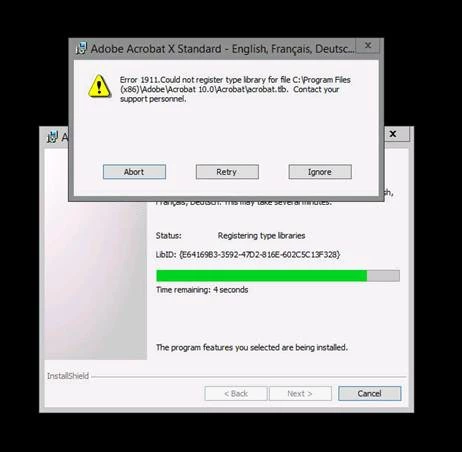
Error 1911 Could not register type library for file C:\Program Files(x86)\Adobe\Acrobat 10.0\Acrobat\acrobat.tib When installing Adobe Acrobat X Standard on Windows Server 2012

  • July 30, 2015
  • 5 replies
  • 25998 views

Receiving this error when installing Adobe acrobat on a Windows 2012 terminal server. "Error 1911 Could not register type library for file C:\Program Files(x86)\Adobe\Acrobat 10.0\Acrobat\acrobat.tib" What could be causing this issue?
This topic has been closed for replies.
Correct answer REMAX_Jay

I have a fix that worked for non-Adobe software that will probably work for you.  I've been beating my head trying to figure out Error 1911 for my company's Escrow processing software and after 3 sleepless nights I finally was able to get past the errors and complete the installation.  Uninstall Windows Update KB3072630 and restart!   It worked for Server 2008 R2 and should work for 2012 as well.

5 replies

slimbrady
Participant
May 25, 2016

I am getting this message as well on one of our client's servers. OS is Windows Server 2012 R2. Software has been working fine but latest update to Acrobat XI won't apply and it contains a fix that is supposed to address the client's issue. Anyone have additional suggestions? Have tried everything in this thread.

Participant
April 6, 2016

I was able to ignore the messages.  Adobe opened, read files, and installed the PDF printer.  I'm not sure what these are actually registering, but it seemed to work after I ignored the registry errors.

REMAX_Jay
REMAX_JayCorrect answer
Participant
August 27, 2015

I have a fix that worked for non-Adobe software that will probably work for you.  I've been beating my head trying to figure out Error 1911 for my company's Escrow processing software and after 3 sleepless nights I finally was able to get past the errors and complete the installation.  Uninstall Windows Update KB3072630 and restart!   It worked for Server 2008 R2 and should work for 2012 as well.

jackyh68
Participant
September 4, 2015

THANK YOU!!! That worked.  I had seen reports of this KB causing issues with our document management installation but it hadn't affected us so I did not put two and two together.  I really appreciate your reply.

August 20, 2015

Hi lucass31549872‌,

Did you find a solution to this issue? I'm having the same issue on Server 2008 R2.

Thanks!


jackyh68
Participant
August 20, 2015

Same here.  I am trying to apply the latest security patch 10.1.15 and cannot update it on any Windows 2008 r2 servers.  Even if I run the cleaner and completely uninstall Acrobat Standard then just run the acrostan.msi - I receive the same error as noted above - it will not register any of the .tlb files.

Anubha Goel
Participating Frequently
August 3, 2015

Hi lucass31549872,

I suppose there might be some compatibility issue of Acrobat X version on Windows Server 2012 platform.

Refer: System requirements | Acrobat family of products—older versions (XI, X, 9)

Regards,

Anubha

August 4, 2015

The same software was previously installed on the Server, It was just uninstalled a short time before the Installation was attempted.

Thanks for the response though.