
Gabi_Gavrila
Participating Frequently
May 14, 2016
Answered

Error 2148073485 on DC

  • May 14, 2016
  • 9 replies
  • 13347 views

Hello!

i need some help...

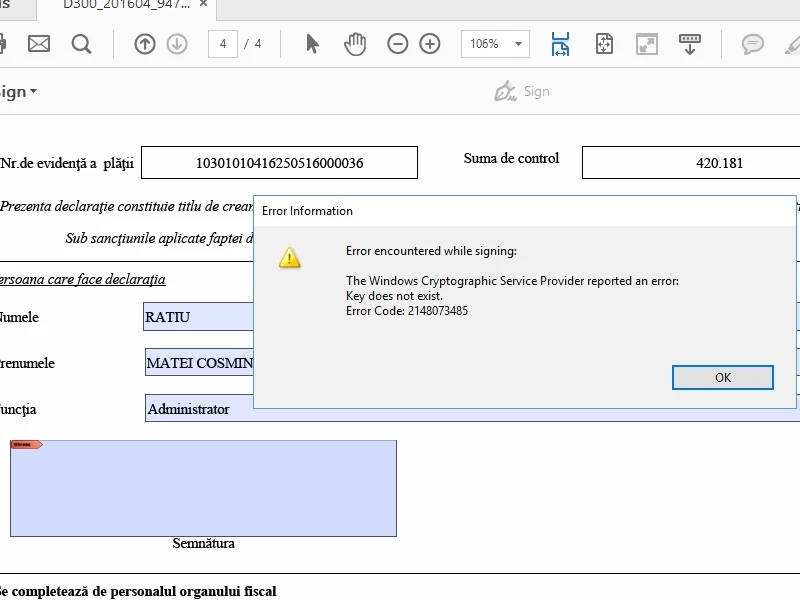
when i try to sign a documet  using Acrobar Reader DC (Windows10) i receive this message:

The Windows Cryptographic Service Provider reported an error:

Key does not exist.

Error Code: 2148073485

How can i fix it?
This topic has been closed for replies.
Correct answer AshuMittal9644438

Hi all,

We have released a patch today that fixes the Digital Certificates issue that was recently introduced. If you are not already updated to the latest patch, simply open Acrobat and visit Help > Check for updates to apply this patch.

More details about this release and bug fixes is available here: https://helpx.adobe.com/acrobat/release-note/acrobat-dc-june-02-2016.htm

Please give it a try and let us know.

Thanks,

-ashu

9 replies

AshuMittal9644438
Adobe Employee
AshuMittal9644438Correct answer
Adobe Employee
June 2, 2016

Hi all,

We have released a patch today that fixes the Digital Certificates issue that was recently introduced. If you are not already updated to the latest patch, simply open Acrobat and visit Help > Check for updates to apply this patch.

More details about this release and bug fixes is available here: https://helpx.adobe.com/acrobat/release-note/acrobat-dc-june-02-2016.htm

Please give it a try and let us know.

Thanks,

-ashu

Participant
June 2, 2016

I have installed the patch and am still unable to sign documents.

Adobe Employee
May 20, 2016

Hi Gabi and everyone else facing the issue,

With the Reader DC release 15.016.20039, we have deprecated use of SHA1 hash while signing. SHA256 has been the default hashing algorithm, but in the prior releases in case the CSP driver doesn’t support SHA256 or higher hashes Reader used to silently fallback to SHA1 hash while creating the signature. In this release, we have removed the silent fallback to SHA1 due to which this error pops up and subsequently signing fails.

Please let me know the driver of the e-token device your are using for signing.

Also, check with the driver manufacturer for the updated driver that should resolve this error.

May 20, 2016

Hi Kshakti,

As you can observe from the above comments, the vast majority is using the SafeNet Authentication Client (8.2) driver.

We have started to use the latest available driver provided by Gemalto in April (SafeNet Authentication Client , version 10.0.43.0) and it still returns the error from the subject in Adobe DC, above mentioned version.

I understand that you didn't permit the fallback to SHA1 any more, but there are other applications which are using the same configuration, calculates the algorithm with SHA256 and doesn't return any error message regarding with the keyset from the token.

Please check again the update and try to fix this issue.

Thank you!

Adobe Employee
May 20, 2016

Hi Csaba,

Thanks for the information.

Can you please let me know the below :

1) With the earlier version of Adobe Reader, in which signing using the same driver used to work, what was the hash algorithm ?

     It can be find by below steps:

     - Sign the PDF using older version of Reader.

     - Open signature panel on the left.

     - Select Signature, right click on it and select Show signature properties...

     - In the signature properties dialog click Advanced properties..

     - In hash algorithm let me know the hashing algorithm.

2) Other applications are signing using PKCS#11 or crypto methods ?

Thanks & Regards,

Shakti Keshri

Participant
May 19, 2016

I also have the same issue - Acrobat DC / WIN 7 PRO. I can sign in Reader. It is a new smartcard and I was signing documents with the old card. I can sign documents on other computers and can log in to sites with this one. Seems to be Acrobat DC related. Talked with Adobe support Rep on phone but he was ABSOLUTELY NO HELP AT ALL!!

Please fix this issue!!!!!!

Rave
Community Manager
Community Manager
May 19, 2016

Hi All,

Thanks for reporting this issue.

We are looking into it. I will get back to you in case more information is required.

Regards,
Rave

Participant
May 19, 2016

I am also having this problem using SafeNet, Identrust Card and Adobe Acrobat DC. I have tried using Adobe Reader version 11 and still am unable to sign PDFs. This just started last week for me also.

May 18, 2016

I have regularly signed PDFs in the past using Active Client, and recently I started getting the same error and error code using version 2015.016.20039 of Adobe Acrobat Reader DC on Windows 8.1 Pro. I hope this gets fixed soon.

Participant
May 18, 2016

.Update your Active Client to version 7, this worked for us

Participant
May 16, 2016

Hello Gabi,

My team has been working on this issue for several hours and we finally found a fix. I don't know what you're using for your signature, but we use our Smartcards which rely on a software called ActivClient (Military / DoD uses this type).

In order to make this error go away, we had to update our ActivClient installations from version 6 to version 7.

Gabi_Gavrila
Participating Frequently
May 16, 2016

i use SafeNet Autenthification Client 8.2.85.0 whith Alladin Token JC 0 (Java).

I expect an update from Adobe.

until then, I dropped Adobe DC and now I use Adobe Reader 11

Community Manager
May 14, 2016

Hi ,

Problem of this kind usually happens when the driver that supports your token does not fully conform to all applicable standards. Some signing applications are lenient to some of the mismatch and you can still use your token for signing in those apps. Acrobat is more stringent about it.

Without actually having your token it is difficult to investigate further.

Regards,

Yatharth

May 16, 2016

Hi Yatharth,

I think Gabi Gavrila is using a SafeNet product, like SafeNet Authentication Client as eToken driver. I'm sure, the drivers/devices provided by SafeNet are fully conform with the applicable standards, at least they didn't have any issue signing PDF documents until last week.

The above reported problem started to appear with version Adobe Acrobat Reader DC 15.016.20039. Some older versions of Adobe does work continuously without giving any error message.

Regards,

Csaba

Gabi_Gavrila
Participating Frequently
May 16, 2016

that is correct.

the problem appeared few days ago.  Adobe probably has been updated and the new version has a bug.

today I installed an older version of Adobe (11) and it works.

Community Manager
May 14, 2016

Hi ,

Please provide the exact dot version of the software & OS installed at your system .Also check whether is there any update available for the software after going through "help > check for updates "

If you are on Windows OS, open Acrobat, navigate to Help menu & repair the installation.

Is this happening with all the documents or with certain document.

Please refer to this article :- Error: "Creation of this signature could not be completed. Platform Exception" when you sign a PDF (Adobe Acrobat 8, 9 o…

Regards,

Yatharth

Gabi_Gavrila
Participating Frequently
May 14, 2016

i have Adobe Acrobat Reader DC 15.016.20039. No update available.

this is happening with all documents when i try to sign whith Adobe.

Whith other program (dedicated) signature works. Certificate is valid, token work.