Participant
January 12, 2022
Question

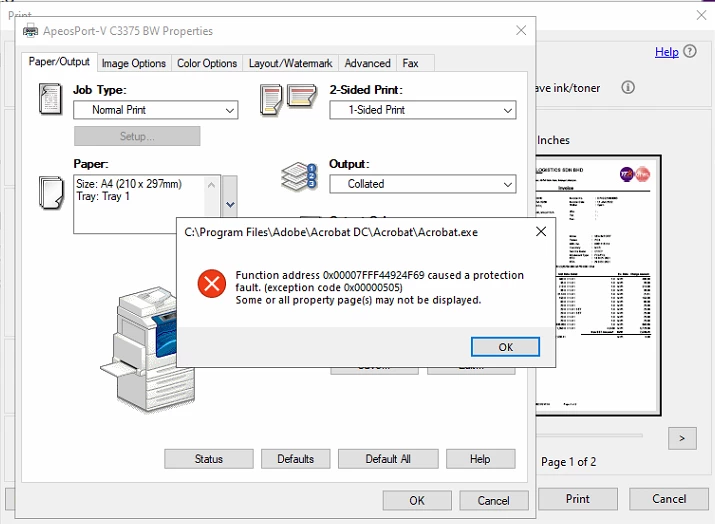
Error code.

  • January 12, 2022
  • 1 reply
  • 1885 views

Function address 0x0007FFF44924F69 caused a protection fault (exception code 0x00000505)

Some or all property page may not be displayed

This topic has been closed for replies.

1 reply

ls_rbls
Community Expert
Community Expert
January 12, 2022

Please be a little more specific about the operating system, the printing device hardware and software currently in use, and the type of PDF document that you were trying to print (or scan).


Also, is this happening with every document that you try to print after a recent update or is it just one document?


Is this a stand alone computer hooked up directly to that printing device or is this a shared printing device in a local area network? a virtual environment perhaps?


Do you get the same error if you open the same document from a web browser with PDF viewing capability and print directly to that device from the web browser?


In any case, it looks as if you're using the 64bit version of Adobe Acrobat Pro or Adobe Acrobat Reader with an 32bit printing software environment.


Was the computer where this error is ocurring recently upgraded to a 64 bit version of Acrobat?

Participant
January 12, 2022

Hi,


When i open the PDF, to print and properties then click ok, it will appear this error.


Is a stand alone computer hooked up directly to that printing device.


I got the same error regardless from web browser or application.


I installed the 64 bit printer software same as adobe.


I had no idea when they download this, but i reinstalled from the website already and still same issue.


Any advise?


ls_rbls
Community Expert
Community Expert
January 12, 2022

What happens if you click on Help--->> Repair Installation?


Conversely, what happens if uninstall and reinstall the printing device driver ?


I can think of some of the following troubleshooting steps:


In which, the following attempts makes sense to me at this point:


  • ensuring that this printing device is set as the default printer
  • disabling data execution prevention
  • or also running the compatibility wizard and selecting from the given list an older version of MS Windows to emulate the printer software.