Error installing Adobe Reader from APP
Hi,
There seems to be an error when I try to install Adobe Reader from the Creative Cloud app.
I try to make it as short as possible to provide info:
First I see this:
Translation to English: Installation failed. More info. AGAIN.

Next step is this:
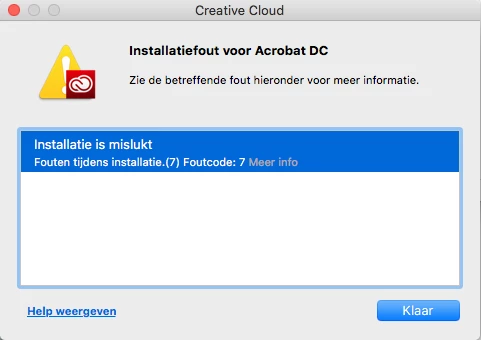
And when I press on: More info. I get reconnect to this webpage with following text:
Exit Code: 7
Please see specific errors below for troubleshooting. For example, ERROR: DW003, DW006 ...
-------------------------------------- Summary --------------------------------------
- 0 fatal error(s), 2 error(s)
----------- Payload: Adobe Acrobat DC 19.12.20034.0 Acrobat DC/Acrobat DC Installer.pkg_19.012.20034 -----------
ERROR: DW006: Apple Package failed to install successfully.
ERROR: DW003: Third party payload installer /tmp/EF85AAFB-6B58-44C7-8A16-5E8FEDA70B98/Acrobat_DC_Web_WWMUI/Acrobat DC/Acrobat DC Installer.pkg failed with exit code: 1
-------------------------------------------------------------------------------------
I've tried looking everywhere on adobe troubleshooting and forums. But the files don't exist on my computer.
Sidenote:
These problems started after I tried to clean up my adobe files with the Adobe clean up program, because the latest photoshop and illustrator crashes on my High Sierra and I don't know if earlier versions would cause less troubles in future.
Love to hear some feedback on this. English or Dutch is very welcome!
Thanks,
Simon
 AdChoices