


Feb 28, 2016 4:36 AM UTC
Answered

%%[ Error: invalidfont; OffendingCommand: xshow

When printing to the PDF driver this error happens and the print is not completed. 

%%[ ProductName: Distiller ]%%

XB9A2A82D not found, using Courier.

%%[ Error: invalidfont; OffendingCommand: xshow ]%%

Stack:

[85 94 94 39 93 47 63 46 86 47 39 0]

(           

  )

0.0

[]

10.0

1

1

1.0

false

%%[ Flushing: rest of job (to end-of-file) will be ignored ]%%

%%[ Warning: PostScript error. No PDF file produced. ] %%

How is the error fixed?

Thanks,

Carl
YatharthSCorrect answer
Participating Frequently
Feb 28, 2016 10:36 AM UTC

Hi,


Please check whether is there any update available for the software after going through "help > check for updates "

Follow this thread to reset the preferences for the Acrobat software :- How to reset Preference settings in Acrobat.


This error can be resolved by changing one of the Adobe PDF printer settings.

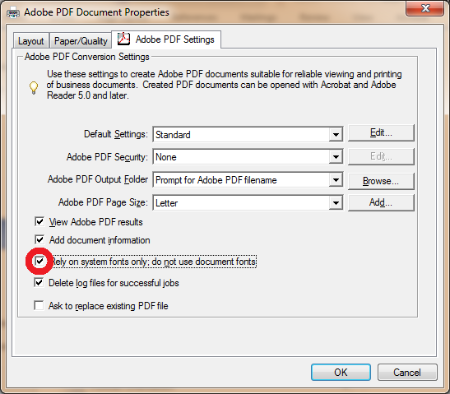
  • When you are in the print dialog, and you have selected the appropriate PDF printer, select "Properties."
  • In the dialog box, there should be a tab titled "Adobe PDF Settings," and it should look like the below image.

  • Un-check "Rely on system fonts only; do not use document fonts."

Click OK,then quit & relaunch the application.

Let me know if it works.


Regards,

Yatharth

25 replies

Lilhapy1
Participant
Apr 9, 2026 6:21 PM UTC

This fixed my problem when printing from Microsoft Outlook on 4/9/2026.

Translate
Participant
Sep 12, 2024 12:06 PM UTC

I just got the same error and this solution worked, in 2024 🙂

Translate
Participant
Feb 13, 2024 6:14 PM UTC

This worked for me, though the main difference is that restarting Word made the unchecked box change go away. So I did NOT restart Word after unchecking the "Rely on system fonts only; do not use document fonts." box, and I was able to FINALLY create a PDF ... #goodgrief 

Translate
Participant
Feb 10, 2024 7:47 PM UTC

I had to remove the latest update as the invalid font TI30EmuKeys did allow my documents to print. I write materials for GED math students and this font is a necessary font.

Translate
Participant
Sep 12, 2023 9:41 PM UTC

I am having the exact same problem. Nightmare scenario. Completely unable to create PDF's no matter which way round I do it. From Acrobat, from Word, Print, Export, my COM ADDIN is now gone too. Is it my computer that's the issue? I am starting to think so and am running a full system scan. Please help!!

Translate
Participant
Jul 30, 2020 6:54 AM UTC

This works! My problem is finally solved!

Translate
Participant
Nov 15, 2019 2:56 AM UTC

It didn't work on win10 Edge browser.

Translate
YatharthSCorrect answer
Participating Frequently
Feb 28, 2016 10:36 AM UTC

Hi,


Please check whether is there any update available for the software after going through "help > check for updates "

Follow this thread to reset the preferences for the Acrobat software :- How to reset Preference settings in Acrobat.


This error can be resolved by changing one of the Adobe PDF printer settings.

  • When you are in the print dialog, and you have selected the appropriate PDF printer, select "Properties."
  • In the dialog box, there should be a tab titled "Adobe PDF Settings," and it should look like the below image.

  • Un-check "Rely on system fonts only; do not use document fonts."

Click OK,then quit & relaunch the application.

Let me know if it works.


Regards,

Yatharth

Translate
Participant
Aug 8, 2017 10:40 PM UTC

I tried many work-arounds; what finally worked was simply "save as" from within MS Word. D'oh!

Translate
dyrindatyson
Participant
Dec 1, 2017 4:37 PM UTC

Exporting from MS Word worked for me as well.

Translate