


Angela Mansi
Participant
February 10, 2026
Question

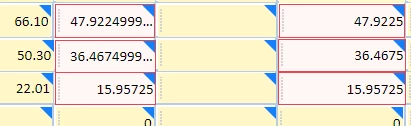
Error message to correct too many numbers after the decimal when requesting an e-signature. The Properties Format tab is set for 2 decimal places. Never received this message before. Any idea what is causing this?

  • February 10, 2026
  • 2 replies
  • 7 views


    2 replies

    Angela Mansi
    Participant
    February 17, 2026

    @creative explorer Thank you for your reply.  The format tab is set to 2 decimal places in Properties.  I’ve included a screenshot showing it set to 2 decimal places.  It was calculating correctly until I updated the mileage rate to the current rate which is .725.  Because it is a 3 decimal place number, I think it does the calculation, but it doesn’t consider the format is set to 2 decimal places.

    creative explorer
    Community Expert
    Community Expert
    February 14, 2026

    @Angela Mansi Maybe what is being displayed is the calculated view. If you edit the properties to that cell, you can likely change the format and set the number to 2 decimal places.

    m