

Participant
March 5, 2025
Answered

Error messages when using Adobe

  • March 5, 2025
  • 1 reply
  • 1406 views

I keep on getting the following error message when I use Adobe
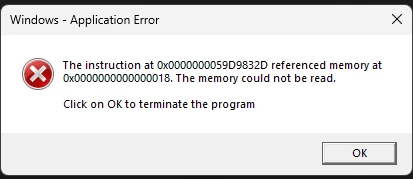
How can I resolve this?

Correct answer Meenakshi_Negi

Hi JOUB Group,


Thank you for reaching out.


Please ensure that the application is updated to the latest version. Try reinstalling the application once to see if that changes the behavior. Try to reinstall the application using the following steps:  

-Remove the application and run the cleaner tool (https://adobe.ly/3DfG3SA).
-Reboot the machine
-Install Adobe Acrobat from the following page: https://adobe.ly/4h7ZP0b;


If that does not help, please share the diagnostic logs with us so we can investigate further. To collect logs, use the steps suggested in the following help document: https://adobe.ly/4h7ZPxd


Thanks,

Meenakshi


1 reply

Meenakshi_Negi
Meenakshi_NegiCorrect answer
Legend
March 5, 2025

Hi JOUB Group,


Thank you for reaching out.


Please ensure that the application is updated to the latest version. Try reinstalling the application once to see if that changes the behavior. Try to reinstall the application using the following steps:  

-Remove the application and run the cleaner tool (https://adobe.ly/3DfG3SA).
-Reboot the machine
-Install Adobe Acrobat from the following page: https://adobe.ly/4h7ZP0b;


If that does not help, please share the diagnostic logs with us so we can investigate further. To collect logs, use the steps suggested in the following help document: https://adobe.ly/4h7ZPxd


Thanks,

Meenakshi
