
February 21, 2019
Question

Error opening URL to submit this form

  • February 21, 2019
  • 1 reply
  • 3501 views

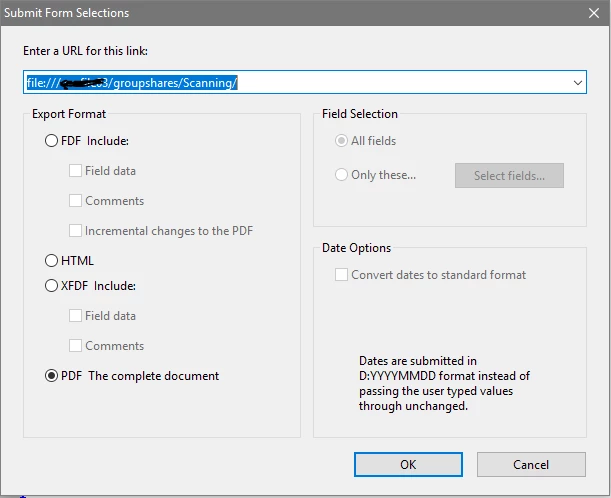
Hello! I'm trying to create an internal referral form and am hitting a wall. Ideally when a user clicks the submit form button, the PDF is sent to a directory on a network share that everyone has access to BUT when I click on the button, I get "Error opening URL to submit this form". Here are my settings for the Submit Form selections, what am I doing wrong?
This topic has been closed for replies.

1 reply

Thom Parker
Community Expert
Community Expert
February 21, 2019

The Acrobat submit is exactly the same as a Web form submit. It sends an HTTP Post to a web server.  It does not write the file to a folder.

You could write a server script to receive the submit save the file on the shared drive. Or you could use a different technique.

Here's an article on saving a PDF from a script.

https://acrobatusers.com/tutorials/how-save-pdf-acrobat-javascript

Thom Parker - Software Developer at PDFScriptingUse the Acrobat JavaScript Reference early and often
February 21, 2019

I get what you're saying but according to this article Setting action buttons in PDF forms, Adobe Acrobat  I should be able to save to a local share ...

Participant
August 4, 2020

I am getting the same Error.  Trying to submit to a server folder.  Follwed the articles instructions.  Any resolve?