
Participant
October 27, 2020
Question

error when opening files on the desktop because location in not available

  • October 27, 2020
  • 1 reply
  • 1331 views

Trying to open a pdf file on the desktop, adobe reports an error specifying that the file has not been found. In particular, following the File/Open/Desktop path, the following message appears "Location si not available".
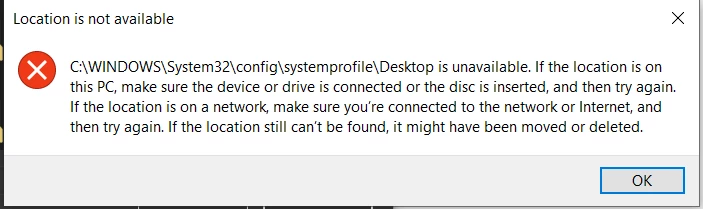
How can I fix it?
Thank you

This topic has been closed for replies.

1 reply

Amal.
Community Manager
Community Manager
October 28, 2020

Hi Maurizio,


Hope you are doing well and sorry for the trouble. As described, you are getting the error 'Location not available' when you try to open the PDF.


Would you mind sharing the workflow/steps you are doing to open the PDF file? Please try to open the PDF using the double click on the PDF file or from the file menu within Adobe Acrobat (Vise-versa) and check.


If the file is stored on a shared network/drive please try to download the file to your computer locally and then try to open it and check.


You may also try to turn off the protected mode for testing (Windows Only) Go to Edit (Windows), Adobe Acrobat (Mac) > Preferences > Enhanced security > Uncheck 'Enable protected mode at startup', turn off the protected mode and uncheck Enhanced Security > Click OK and reboot the application. 
Note: Turning off the protected mode may possess security risks. Please turn on the security after testing.


Also please try to add the file and the folder path to Adobe Acrobat. Go to Edit (Windows), Adobe Acrobat (Mac) > Preferences > Enhanced security > Add File and Add Folder Path and click OK and reboot the application and see if that helps.


Hope it will help


Regards

Amal

Participant
October 28, 2020

Hi Amal, thanks for your answer but the recommended alternatives do not work.
The problem occurs only by trying to open the files on the local desktop of the pc, either by double-click on the file or from the Reader menu (File/Open/Desktop).

The problem does not occur if the file is saved on any other folder on the PC.

Amal.
Community Manager
Community Manager
November 19, 2020

Hi there


We are sorry for the delay in response. I hope you would be able to fix it by now.


If the issue still exists, would you mind sharing the steps you did to store the files on desktop. Make sure these are not the shotcut of the PDF files and that you have saved the files to desktop.


If it doesn't work, please remove the files from desktop and retry to save the files from the original folder to desktop and see if that helps.


Regards

Amal