


Participant
July 16, 2025
Question

error when opening pdf attachment from new/old Outlook

  • July 16, 2025
  • 1 reply
  • 1260 views


libcef.dll crash when opening PDF attachments from Outlook – Windows 11 24H2 + Acrobat Pro 25.001.20531


Details:
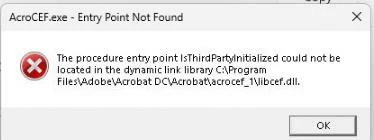
We are encountering a persistent error when opening PDF attachments from New Outlook on machines running Windows 11 24H2. Acrobat Pro (v25.001.20531) & (v25.001.20566) fails to load the libcef.dll component with the following message:


The procedure entry point IsThirdPartyInitialized could not be located in the dynamic link library libcef.dll
Another error
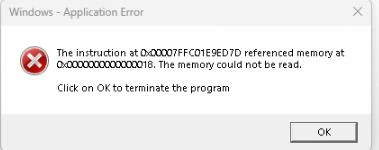


This crash does not occur when opening PDFs directly from Explorer, and only occurs when Outlook attempts to launch the PDF. All workarounds have been attempted, including disabling preview, renaming CEF folders, compatibility mode, and uninstall/reinstall attempts.


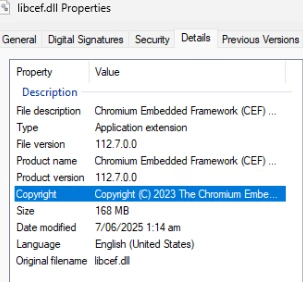
libcef.dll details
 

1 reply

creative explorer
Community Expert
Community Expert
July 20, 2025

@Little5C77 

The core reason this is happening likely lies in a subtle version mismatch or an unexpected interaction between how the new Windows 11 24H2, the New Outlook application, and your specific version of Adobe Acrobat Pro are trying to communicate. The libcef.dll file is a crucial component that helps Acrobat display web content (since Acrobat uses a browser-like engine for many features, including possibly how it handles integration with applications like Outlook). When Outlook tries to hand off the PDF to Acrobat, it expects libcef.dll to have a specific "entry point" or function called IsThirdPartyInitialized. If that function isn't found in the version of libcef.dll that Acrobat is using, or if it's expecting a slightly different version than what the updated Outlook or Windows environment is providing, the entire process crashes, leading to those alarming error messages. It's like two different parts of the system are speaking slightly different dialects of the same language, causing a breakdown in communication.

Given that you've already tried many standard fixes, the solution might involve ensuring complete and precise compatibility across all three components: Windows 11 24H2, New Outlook, and Acrobat Pro 25.001.20531/20566. Since libcef.dll is part of the Chromium Embedded Framework (CEF), which is often updated, it's possible that a slightly newer or older build of CEF is needed to align with the changes in Windows 11 24H2 and New Outlook. While you've reinstalled, sometimes remnants or cached files can persist. A potential solution could be to use the Adobe Creative Cloud Cleaner Tool to perform an even deeper, more thorough removal of all Adobe components, including shared libraries and preferences, and then performing a fresh installation of Acrobat Pro. This ensures that a completely clean version of libcef.dll and its associated components are installed, hopefully resolving any subtle version conflicts or corrupted files that the standard uninstall/reinstall might miss. Additionally, ensure that both Windows 11 and Outlook are fully up-to-date with all available patches, as Microsoft may release fixes for such compatibility issues. If the issue persists after a clean install, it would strongly indicate a need for Adobe to release an update to Acrobat that specifically addresses compatibility with the Windows 11 24H2/New Outlook integration, as this level of error often points to a bug that requires a software patch.

m
Souvik Sadhu
Community Manager
Community Manager
September 25, 2025

Hello @Little5C77,


Hope you are doing well. 


We are live with a new update (25.1.20744) that fixes this issue. Please update the app to the latest version and let us know if the issue is fixed for you.

To check for updates, go to Menu > Help > Check for Updates.


To know more: https://adobe.ly/3Vw1WTd


Regards,
Souvik.