


Participant
March 17, 2025
Question

Error when reading pdfs - Windows application error - referenced memory couldn't be read

  • March 17, 2025
  • 1 reply
  • 835 views

I'm facing an issue when reading pdfs i get windows application error- referenced memory couldnt be read.

This happend to me before on my previous laptop and i changed to new laptop fresh windows install. after few months the issue came back on the new laptop.


I tried the following:

  1. uninstall adobe acrobat reader from control panel and then restart > install adobe acrobat reader
  2. I uninstalled adobe acrobat reader and removed all adobe folders in program files/program files (x86) and appdata\temp. also ran adobecleaner then restarted and installed adobe acrobat reader again.


The issue is still ongoing.
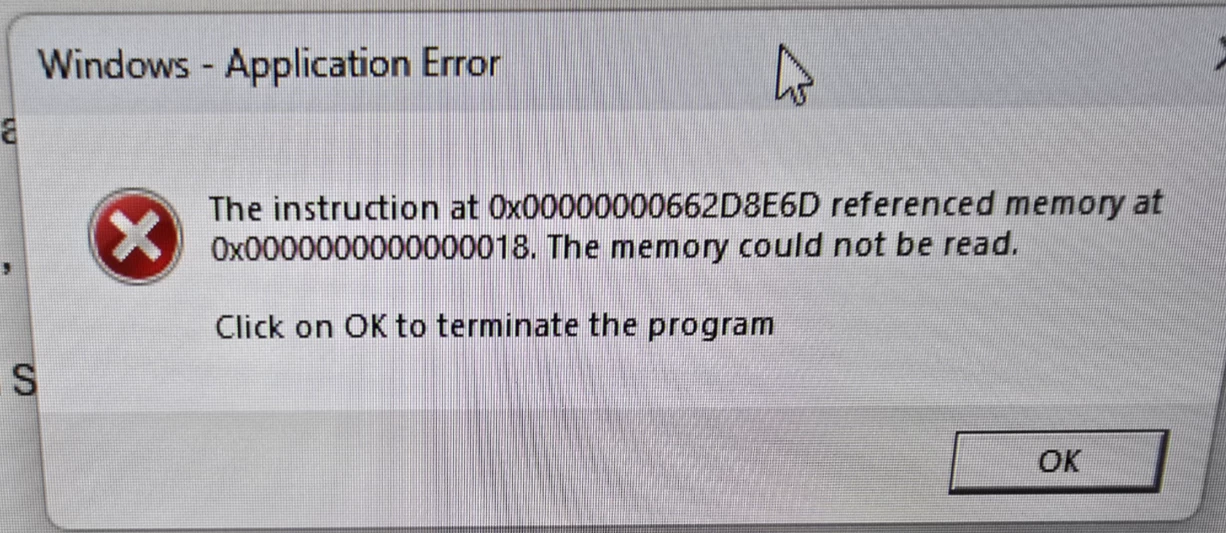
 

1 reply

AnandSri
Community Manager
Community Manager
March 17, 2025

Hello Ammar!


I hope you are doing well.


Please ensure you have the latest version of Acrobat installed on the machine: 25.001.20432 Planned update, Mar 11, 2025. Check for any pending updates from the Menu > help > check for updates, install the updates, restart the app and the machine, and check. For more information, see this: https://adobe.ly/4ihY167.


If you have the latest version installed, Go to Acrobat > Preferences > Security (Enhanced) and uncheck the "Run in AppContainer" checkbox. Then, restart Acrobat.


Ensure that all mandatory and optional operating system updates are installed. After updating, restart your machine. If the issue persists, use the Acrobat Cleaner Tool to remove the installed application, restart your machine, and then reinstall Acrobat.


Let us know how it goes.

Thanks,

Anand Sri.

Participating Frequently
May 12, 2025

Did not work.

AnandSri
Community Manager
Community Manager
June 11, 2025

Hello @spectr1701!


I hope you are doing well, and we apologize for the delayed response and the trouble.


Please install the latest build of Acrobat version: 25.001.20531 (Win), planned update June 10, 2025. Check for any pending updates from the Menu > help > check for updates, install the updates, restart the app and the machine, and try again.


If the issue continues, please provide the following information: the current version of the operating system on your device and the logs from the affected machine. To collect the logs, download and run the Log Collector tool. Make sure to select all log options and attempt to reproduce the issue. After that, close the Log Collector tool; it will generate the logs along with a log ID. Please share this log ID with us for further investigation.


Thanks,

Anand Sri.