


licencesa12661463
Participant
April 17, 2025
Answered

error while adding sharepoint store place

  • April 17, 2025
  • 1 reply
  • 583 views

hello,


a user has a problem opening/adding a sharepoint store place.
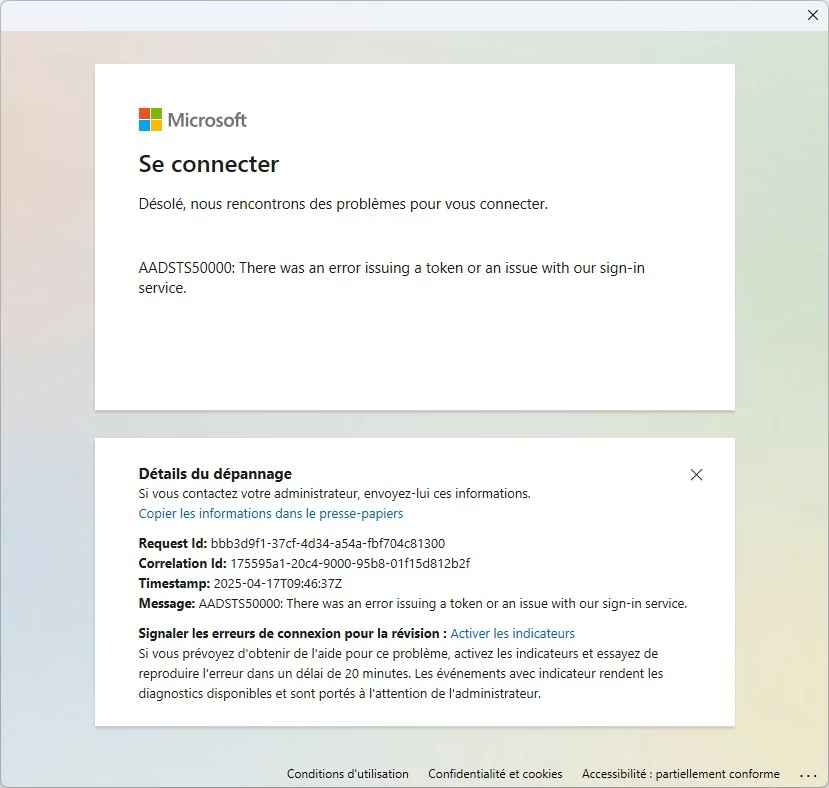
 

i already cleared chrome, edge and firefox cache, not better. i reinstalled adobe reader and deleteing all folders from program files, programdata, user folder, not better.

if i changed the user, it's ok.


can you help me.


Correct answer licencesa12661463

i found the solution, you need to revoke all the o365 user sesssions from entra admin panel.

thanks.

1 reply

creative explorer
Community Expert
Community Expert
April 18, 2025

@licencesa12661463 It appears the issue with accessing the SharePoint store place is specific to the user profile on the computer, as it works fine with a different user. Since clearing the browser cache and reinstalling Adobe Reader didn't resolve the problem, and the error message "AADSTS50000: There was an error issuing a token or an issue with our sign-in service" points to an authentication problem, the issue likely lies within the user's Windows profile and its cached credentials or temporary files related to Microsoft account authentication.

A potential workaround, since creating a new Windows profile resolved the issue, is to migrate the user's essential data (documents, pictures, etc.) to the new profile. While not a direct fix of the underlying problem in the old profile, this allows the user to continue working without the SharePoint access issue. You could also try running the System File Checker (SFC) tool to scan for and repair corrupted system files within the problematic user profile, although given that a new profile works, this may not be directly related to system file corruption but rather user-specific configuration or cached authentication data.

m
licencesa12661463
licencesa12661463AuthorCorrect answer
Participant
April 22, 2025

i found the solution, you need to revoke all the o365 user sesssions from entra admin panel.

thanks.

AnandSri
Legend
April 22, 2025

Hello!


I hope you're doing well, and we apologize for the delayed response and the trouble.


We are glad that you found the solution, and it worked for you. Thank you for sharing the steps which worked and it will help other users on the community in future.


For future references, see this article to learn more about the SharePoint files in Acrobat, Acrobat Reader: https://adobe.ly/42GNfzU, and https://adobe.ly/43YkBfQ


Feel free to reach out to us if you need any assistance.

Thanks for your time and patience on this.

~Anand Sri.