
Participant
March 23, 2023
Question

Error with Acrobat X Pro - Adding Text in Document

  • March 23, 2023
  • 4 replies
  • 785 views

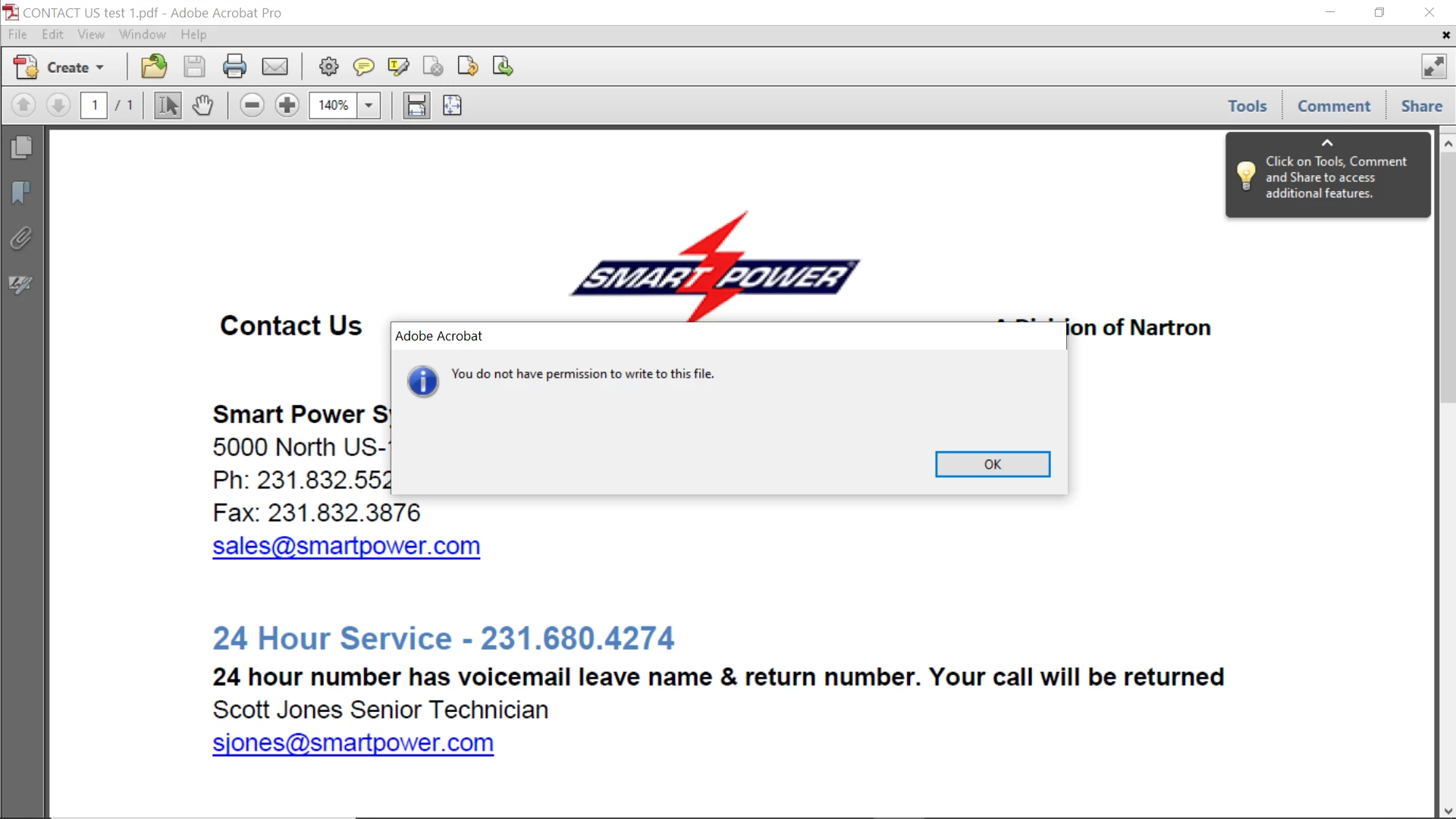
I reinstalled Acrobat X Pro and I am having a problem with "Enable Adding Text in Document". When I try to save the file so I can use the text bar I get this error: "You do not have promission to write to this file" (See attachement). Does anyone have an idea on what I need to do?
This topic has been closed for replies.

4 replies

Legend
March 23, 2023

To use this function you need the very latest Acrobat. It was updated to work in November 2022, and nothing older works. Nor can older versions of Reader pick up the new enabling. I don't say this is a good thing. https://helpx.adobe.com/acrobat/kb/reader-extended-pdfs-and-adobe-root-ca-expiry.html

Bernd Alheit
Community Expert
Community Expert
March 23, 2023

Where does you use "Enable Adding Text in Document"? 

Participant
March 23, 2023

With the document open click on File>Save As>Reader Extended PDF> "Enable Adding Text in Documents"

try67
Community Expert
Community Expert
March 24, 2023

This is no longer possible in older versions of Acrobat. Nor is it needed, really, assuming the file will be opened in a relatively current version of Reader DC.

Participant
March 23, 2023
Any PDF I open and try to save so I can add text to the document comes up with that error.


Any document I have that already has the Typewriter tool works fine.


The PDF I have that I am trying to add text I have downloaded it in the past and it worked just fine. I actually printed it off this morning. Scanned it and then saved it to my laptop. Still get the error. I checked the security on the document as your suggested and it shows full permissions.


George


From: Adobe Support Community Mailer
Sent: Thursday, March 23, 2023 1:47 PM
To: gadams176@charter.net
Subject: Re: [Acrobat] Error with Acrobat X Pro - Adding Text in Document


<>

Adobe Support Community


Eric Dumas <> just posted in a community you follow.


_____


Mar 23, 2023 10:12 AM in Acrobat Discussions <>


Re: Error with Acrobat X Pro - Adding Text in Document <>


Hi,

can you check:

where the file is saved(Local, Network, cloud, external drive...) does this happen to other pdf documents?

This message can happen when:

a file was copied from another source, sometimes it is read-only. Close it, right click on the document to get Properties (it looks like you have a Windows OS) and deselect Read-only (You will also see permissions there) it is opened somewhere else at the same time it is an attachment in an email, save it somewhere on your system first. check the File > Properties > Security to see if there are any settings that would prevent you from editing it check the signatures, just in case it is locked after being signed.


Reply to this message


Note: Replies posted via email are plain-text only. Login to the community to reply with text and images


_____


<>

Adobe Support Community


<>

<>


You may manage your notification settings <> or unsubscribe <> from all Adobe Support Community e-mails.


Adobe is located at 345 Park Avenue, San Jose, CA 95110 USA. Copyright © 2023 Adobe. All rights reserved


Privacy policy <> | Contact Us <>
Eric Dumas
Community Expert
Community Expert
March 23, 2023

Hi, 

can you check:

  • where the file is saved(Local, Network, cloud, external drive...)
  • does this happen to other pdf documents?

This message can happen when:

  • a file was copied from another source, sometimes it is read-only. Close it, right click on the document to get Properties (it looks like you have a Windows OS) and deselect Read-only (You will also see permissions there)
  • it is opened somewhere else at the same time
  • it is an attachment in an email, save it somewhere on your system first.
  • check the File > Properties > Security to see if there are any settings that would prevent you from editing it
  • check the signatures, just in case it is locked after being signed.