
Inspiring
December 7, 2023
Question

Errormessage

  • December 7, 2023
  • 12 replies
  • 380 views

This (error)message pops up everytime after I have closed Adobe Acrobat DC. I just skip it and next time I start Acrobat DC it ok. After the program then is closed the message is on the screen! And the text, Read more, does not give any information.
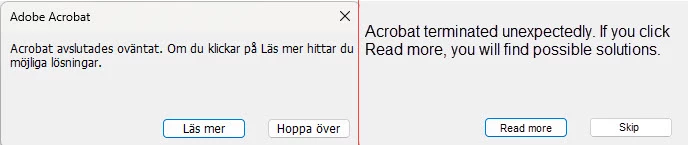
So what can be wrong and how to solve it?


Best from Rolf
in Sweden

This topic is closed to new replies. Start a new post to keep the conversation going.

12 replies

Amal.
Legend
December 7, 2023

Hi @R²85_2 


Hope you are doing well and thanks for reaching out.


What is the version of the Acrobat DC you are using? To check the version go to Help > About Acrobat and make sure you have the recent version 23.06.20380 installed. Go to Help > Check for updates and reboot the computer once.

Also try to repair the installation from the help menu (Win Only) and see if that works.


Please go through the steps provided in the help page https://helpx.adobe.com/acrobat/kb/acrobat-dc-crashes-on-windows-os.html and see if that works.


Let us know how it goes.


~Amal

R²85_2Author
Inspiring
December 7, 2023

Hi.

Version for Adobe Acrobat DC
[En bild som visar text, skärmbild, Teckensnitt Automatiskt genererad beskrivning]

I have done the repair and open and closed a couple of times and don't see the Error message, but...

Med vänlig hälsning/Best regards
Essio AB
Rolf Gustafsson

[P.I Removed by Moderator]