jk24236569
Participant
January 7, 2025
Question

Excel print to pdf not working

  • January 7, 2025
  • 1 reply
  • 281 views

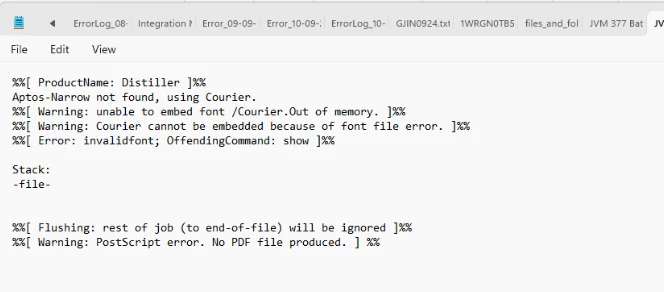
Getting this error while trying to print to pdf


1 reply

S_S
Community Manager
Community Manager
January 15, 2025

Hi @jk24236569,


Hope you are doing well. Sorry for the trouble!


Would you mind updating your Windows OS to the latest patch update and set up Windows Protected Print?


Let me brief you on the core reason for the issue:

  • The issue occurs because the font is not included in the PostScript (PS) file.
  • When the distiller tries to convert the PS file to PDF, it looks for the font in the system folder.
  • However, cloud fonts, which are specific to Microsoft 365, are not available for other applications, leading to the problem.


The immediate fix for this would be to go to Preferences-> uncheck "Rely on system fonts only; do not use document fonts"-> then try the same workflow.


Hope this helps.


-Souvik
