
Inspiring
March 26, 2021
Answered

Exclude values from a calculation based on drop-down selection

  • March 26, 2021
  • 2 replies
  • 1448 views

Okay, thanks to other posts in this beautiful forum, I was able to set up fields that calculate totals based on a dropdown selection, but I'm stuck on one final hurdle and I'm hoping you can help.


I have a field for a Requested funding amount and a separate field for FinalAmount and a FundingStatus dropdown. (Requested and FinalAmount because a non-profit may request money and be approved or denied for less than they requested, but they'll need to be able to see the difference, so I can't just use one field.) I have a field that adds the requested fields, but I need for it to exclude the fields in which someone has set FundingStatus to either "Secured" or "Denied" (because the total should be the outstanding asks you still have).
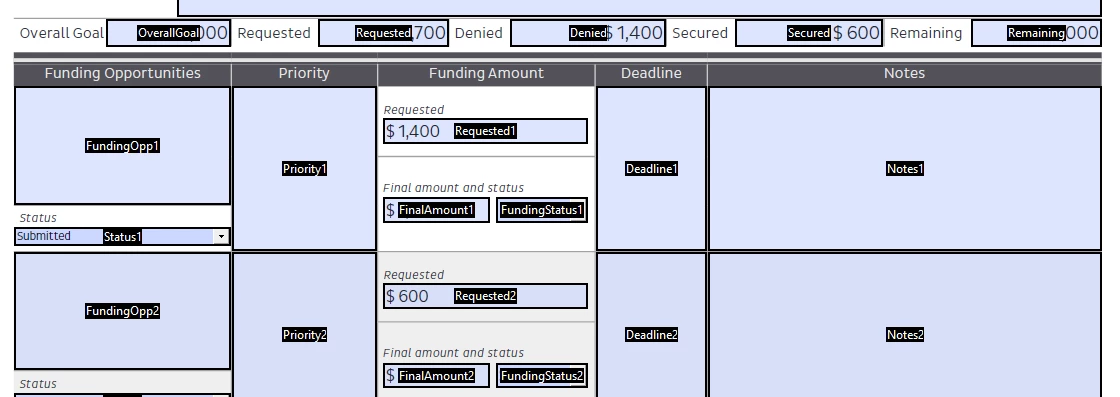
 

Help in untangling the code for the custom calculation script would be deeply appreciated! Everything will be set up as 1, 2, 3, etc, so using a var i is working for me in the calculation of the Denied and Secured fields and I just can't quite get to how to set it up to add Requested1, Requested2, etc if FundingStatus1, FundingStatus2 != "Secured" or "Denied."

This topic has been closed for replies.
Correct answer try67

If I understood you correctly, use this code as the custom calculation script of FinalAmount (adjust the maxFields variable as needed. I assumed you had three):


var maxFields = 3;
var total = 0;
for (var i=1; i<=maxFields; i++) {
	var fundingStatus = this.getField("FundingStatus"+i).valueAsString;
	if (fundingStatus=="Secured" || fundingStatus=="Denied") continue;
	total+=Number(this.getField("Requested"+i).valueAsString);
}
event.value = total;


The second issue is caused by an incorrect fields calculation order.

2 replies

try67
Community Expert
try67Community ExpertCorrect answer
Community Expert
March 26, 2021

If I understood you correctly, use this code as the custom calculation script of FinalAmount (adjust the maxFields variable as needed. I assumed you had three):


var maxFields = 3;
var total = 0;
for (var i=1; i<=maxFields; i++) {
	var fundingStatus = this.getField("FundingStatus"+i).valueAsString;
	if (fundingStatus=="Secured" || fundingStatus=="Denied") continue;
	total+=Number(this.getField("Requested"+i).valueAsString);
}
event.value = total;


The second issue is caused by an incorrect fields calculation order.

Inspiring
March 26, 2021

Thank you so much, that works great! May I ask what the upright bars between the two funding status checks mean? I think I understand the rest of the code via context clues, but I'm curious to learn as many of the functions as possible so I can start to noodle through things on my own at some point!

Nesa Nurani
Community Expert
Community Expert
March 26, 2021

|| = "or",  && = "and", ! = "not".

Inspiring
March 26, 2021

Additionally, in calculating Remaing as a simplified field notation of OverallGoal - Secured, it always appears to be one calculation behind during testing (changing the funding status affects the Secured total field immediately, but it doesn't reflect in Remaining until I edit another field). I...am at a loss on how to handle this part!

Bernd Alheit
Community Expert
Community Expert
March 26, 2021

Change the field calculation order.

Inspiring
March 26, 2021

Ah, that has solved, like, 17 other problems I was having on previous forms, thank you! Such a simple tool I had otherwise totally missed before!


Any thoughts on my initial question?