
Participant
October 16, 2020
Answered

Export data to xml with Acrobat Reader

  • October 16, 2020
  • 1 reply
  • 741 views

Hello all,

I design a form with Pro 11 and when I fill it with text I am exporting all to xml format with a button - action.

The problem is that works o.k. in Pro 11 but it isn't work with Reader and it gives me the error "NotAllowedError: Security settings prevent access to this property or method.
Doc.createDataObject:3:Field xml-but:Mouse Up"
Any idies?


This topic has been closed for replies.
Correct answer Karl Heinz Kremer

It's not supported in Reader. You can find out which JavaScript functions are available in Reader by looking at the API document:


https://help.adobe.com/en_US/acrobat/acrobat_dc_sdk/2015/HTMLHelp/index.html#t=Acro12_MasterBook%2FJS_API_AcroJS%2FDoc_methods.htm%23TOC_createDataObjectbc-18&rhtocid=_6_1_8_23_1_17


You will find this: 


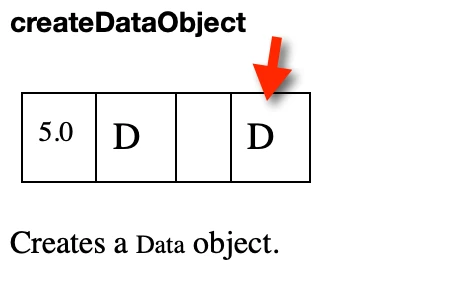
The "D" in the last column is explained in the section about the "Quick Bars", and means that your document needs "File Attachment" rights, which can only be applied using server based workflow software. 

1 reply

Karl Heinz  Kremer
Community Expert
Karl Heinz KremerCommunity ExpertCorrect answer
Community Expert
October 16, 2020

It's not supported in Reader. You can find out which JavaScript functions are available in Reader by looking at the API document:


https://help.adobe.com/en_US/acrobat/acrobat_dc_sdk/2015/HTMLHelp/index.html#t=Acro12_MasterBook%2FJS_API_AcroJS%2FDoc_methods.htm%23TOC_createDataObjectbc-18&rhtocid=_6_1_8_23_1_17


You will find this: 


The "D" in the last column is explained in the section about the "Quick Bars", and means that your document needs "File Attachment" rights, which can only be applied using server based workflow software.