Participant
October 1, 2018
Question

Export to Excel splitting cell values

  • October 1, 2018
  • 1 reply
  • 614 views

We are running window 10 - 1709 and Acrobat Standard DC 2018.011.20058

When exporting this 1 type of PDF that is auto generated from one of our systems, Acrobat splits the cells in 1 field instead of keeping it all as one. We just upgraded to this version of Acrobat.  Before we were running Acrobat Standard DC 2015 Classic Track where this export worked fine.  Anyone have a fix or work around.   I have tried all methods of export, save as, printed to PDF to make a new one then exported.  I have done a side by side comparison, and it appears to be just this one field.

This is how it use to look in 2015, all one cell after the export
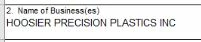
Now its broken in to 5 cells

This topic has been closed for replies.

1 reply

Adobe Employee
October 4, 2018

Hi,

Can you please share your PDF file with us?

Share files online with Adobe Acrobat

Regards,

Akanksha

Melaa24Author
Participant
October 4, 2018

Unfortunately I cannot as it contains information that would breach our security policies.  I tried removing everything but the field that was causing the issue but when I exported it like that it worked correctly. 

Adobe Employee
October 8, 2018

Hi Meela,

In this case, it seems to be a file specific issue. We can investigate the issue better if we get the sample PDF files. Please report us if you can provide any other sample file (which you can share with us) in which you can replicate the issue.

Regards,

Akanksha Garg

Software Engineer

Adobe Acrobat Team