


mikaelo73835883
Participant
May 18, 2021
Answered

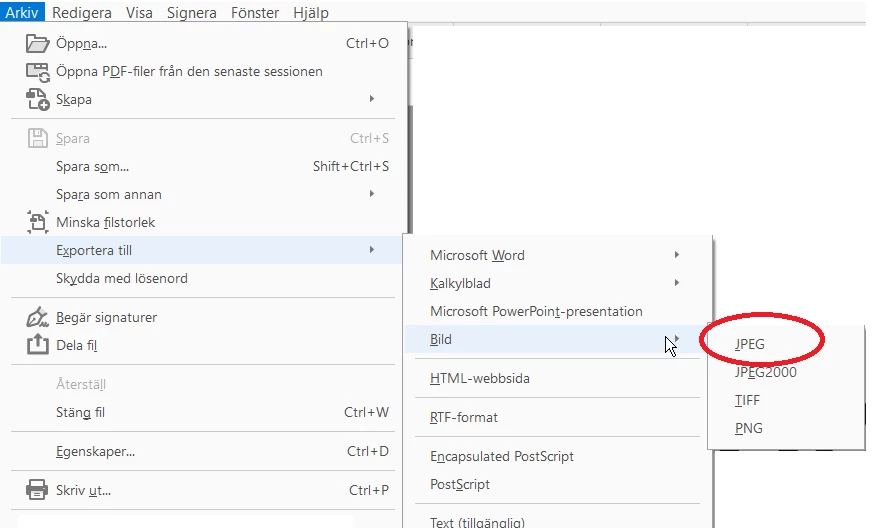
Export to image JPEG Network drive

  • May 18, 2021
  • 2 replies
  • 5404 views

We have been using the function Export > Save To Image > JPEG for at least 10 years in Acrobat, 4 users, everyday. Since february 2 of our users got this problem and now last month the other 2 also got it. So this problem can be realeated to Windows Update or Adobe Updates

When saving to JPEG to a network-drive (eg. S:\FOLDER\ ) a temp file is createad and disapears. And no JPEG can be found in the folder. In acrobat you can see the loadbar for a quick secound. 

The same problem if you save to the correct URI of the server  (eg. \\SERVERHOSTNAME\Folder\  )


If you save the file to C:\FOLDER\ the processes works without any problem

And now the realy strange part.
If you save as PNG to the networkdrive, then it works. The file appears in the correct folder 


Correct answer Amal.

I have exactly the same problem. Interestingly it only "reared its ugly head" after I upgraded this laptop from Win10 to Win11.  Evidently Microsoft is being very prissy about "rights" in Win11.  Frustrating!! I must now export the JPEG to my local desktop then move it to the network drive later.  Pain in the butt!!  Another "feature" of Win11.


Hi there,


Hope you are doing well.  


I understand how frustrating this issue can be, especially when it disrupts your workflow. The behavior you're describing could be related to changes in how Windows 11 handles file permissions and network drive access. For more information, please try to get in touch with the MS Support team and see if that works.


2 replies

CrashPen
Participant
February 16, 2023

Same problem! Very frustrating

Legend
February 16, 2023

Some people find image saving works better if Protected Mode At Startup is OFF (Preferences - Security (Enhanced))

mikaelo73835883
Participant
February 16, 2023
Participant
October 12, 2022

My Acrobat Pro is having this exact same problem - after working for years it no longer exports JPEGs to a network location. PNG and other image types work, and JPEGs work when exported to local drives on my computer.


We have tried updating and reinstalling Acrobat, as well as adjusting quite a few settings to no avail.


We were also able to quickly grab a temp file before it dissapeared and it opens in Photoshop but is very distorted. 


Does anyone know of any solutions?

Known Participant
March 19, 2023

same problem