
GasparInsurance
Participant
May 7, 2020
Answered

Exporting a fillable form becomes distorted

  • May 7, 2020
  • 1 reply
  • 1619 views

Hello! 
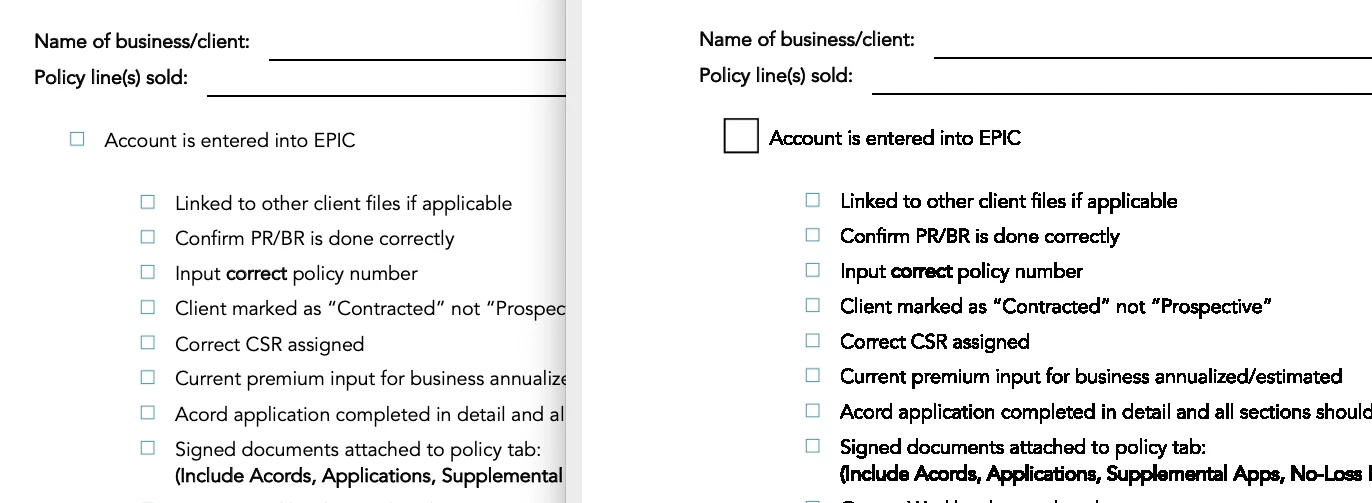
I am running into an issue that when I create a form from a PDF in Acrobat (pdf originally created by Word) and I save the form, it becomes very distorted. Has anyone else had this issue and found a resolution? I have tried numerous help threads and nothing seems to work. 


Here is a comparison of the PDF from Word on the left, and the PDF form on the right after saving it in Acrobat. The text becomes very pixilated and distorted. I am on Acrobat Pro DC (Creative Cloud).


Thank you

This topic has been closed for replies.
Correct answer GasparInsurance

Hi Amal,


Thank you - while I was writing my steps I realized my mistake... I was saving the PDF from the original file. The fix for me was to SAVE AS for a new file. That resolved it.


My process was File > Create Form > Edit Fields > Save

I am on Mac and on the latest version via Create Cloud (2020.006.20042)

1 reply

Amal.
Legend
May 7, 2020

Hi there


We are sorry for the trouble. As described the PDF form becomes distorted after saving.


Is this a behavior with a particular PDF file or with all the PDFs? Please try with a different PDF file and check.


We need some more information for a better understanding:


  • Would you mind sharin the workflow/steps you are doing to create the PDF form?
  • What is the version of the Adobe Acrobat DC you are using? To check the version of the application please go to Help > About Adobe Acrobat DC
    Make sure you have the latest version installed. Go to Help > Check for Updates.
    For more information please refer to the help article  (https://www.adobe.com/devnet-docs/acrobatetk/tools/ReleaseNotesDC/index.html)


Please try to repiar the installation (For Windows Only) and see if that helps. You may also try to reset the preferences to default ss described here (https://community.adobe.com/t5/acrobat/how-to-reset-acrobat-preference-settings-to-default/td-p/4792082?page=1)


Let us know how it goes


Regards

Amal


GasparInsurance
GasparInsuranceAuthorCorrect answer
Participant
May 7, 2020

Hi Amal,


Thank you - while I was writing my steps I realized my mistake... I was saving the PDF from the original file. The fix for me was to SAVE AS for a new file. That resolved it.


My process was File > Create Form > Edit Fields > Save

I am on Mac and on the latest version via Create Cloud (2020.006.20042)

Amal.
Legend
May 8, 2020

Hi there


We are glad to hear that the issue got fixed.


Feel free to contact us for any assistance required in the future.


Regards

Amal