Participating Frequently
October 18, 2022
Answered

Extracting text from a defined position in Adobe Acrobat DC using Javascript

  • October 18, 2022
  • 2 replies
  • 3981 views

I have a PDF document of about 2100 pages. The document contains nested bookmarks for each section, sub-section (and sub-sub-section and so on...). However the document does not contain a Table of Content so that when the document is printed, the reader could easily navigate to the required resource.


Extracting Bookmarks was easy enough. I used a script from Adobe's JS API reference as below:

function DumpBookmark(bkm, nLevel)
{
    var s = "";
    for (var i = 0; i < nLevel; i++) s += " ";
    console.println(s + "+-" + bkm.name);
    if (bkm.children != null)
        for (var i = 0; i < bkm.children.length; i++)
            DumpBookmark(bkm.children[i], nLevel + 1);
}
console.clear(); console.show();
console.println("Dumping all bookmarks in the document.");
DumpBookmark(this.bookmarkRoot, 0);

The above script does half of the job, i.e. extract the bookmarks and print them in hierarchical order. The issue I am stuck at is how to extract the page number that is being displayed in the footer. Since the whole purpose of this exercise is to create a TOC (doesn't need to be clickable) for readers using printed copy and the page number printed in the footer differs from "this.pageNum" value.


Is there a way to read the current page, define a boundary and extract all the text from that boundary?

This topic has been closed for replies.
Correct answer bebarth

Hi,

I gave you a quick answer, but spending a bit more time it is possible to improve the script.

Here is what I did:

d0=new Date();
debut=util.printd("date(en){MMMM DD, YYYY}",d0,true)+util.printd(" – hh:MM:ss tt",d0);;
function tableOfContents(bkm, nLevel) {
    var s="";
    for (var i=0; i<nLevel; i++) s+=" ";
	bkm.execute();
	var p=this.pageNum;
	console.clear();
	console.println("Process starting: "+debut);
	console.println("Processing the page #"+(p+1)+"/"+this.numPages);
	var pageName="";
	var numWords=this.getPageNumWords(p);
	for (var i=0; i<numWords; i++) {
		var ckWord=this.getPageNthWord(p, i, false);
		var q=this.getPageNthWordQuads(p, i);
		m=(new Matrix2D).fromRotated(this,p);
		mInv=m.invert();
		r=mInv.transform(q);
		r=r.toString();
		r=r.split(",");
		if (Number(r[0])>300 && Number(r[1])<35) pageName+=ckWord;
	}
    if (bkm.name!="Root") {
		var designation=bkm.name.replace(/\t/g," ").replace(/\s*$/,"");
		var pageName=pageName.replace(/\s*$/,"");
		toc+=s+designation+dots.substr(0,dots.length-(s.length+designation.length+pageName.length))+pageName+"\r";

	}
    if (bkm.children != null) for (var i=0; i<bkm.children.length; i++) tableOfContents(bkm.children[i], nLevel+1);
}
var aRect=this.getPageBox("Crop");
var h=aRect[1];
aRect[1]=50;
this.setPageBoxes({cBox: "Crop", rBox: aRect});
var toc="";
var dots="............................................................";
tableOfContents(this.bookmarkRoot, 0);
aRect[1]=h;
this.setPageBoxes({cBox: "Crop", rBox: aRect});
this.createDataObject("toc.txt", "","text/html");
var oFile=util.streamFromString(toc);
this.setDataObjectContents("toc.txt", oFile);
event.target.viewState={overViewMode:7};
df=new Date();
fin=util.printd("date(en){MMMM DD, YYYY}",df,true)+util.printd(" – hh:MM:ss tt",df);;
console.println("\rProcess ending: "+fin);
temps=(df.valueOf()-d0.valueOf())/1000/60;
var lesMinutes=parseInt(temps);
var lesSecondes=(temps-lesMinutes)*60;
var lesSecondes=parseInt(lesSecondes*10)/10;
var leTemps="";
if (lesMinutes>0) {
	if (lesMinutes==1) var leTemps="1 minute";
	else var leTemps=lesMinutes+" minutes";
}
if (lesSecondes>0) {
	if (lesSecondes<2) var leTemps=leTemps+" "+lesSecondes+" second";
	else var leTemps=leTemps+" "+lesSecondes+" seconds";
}
var leTemps=leTemps.replace(/^\s+|\s+$/gm,"");
console.clear(); console.show();
console.println("Process starting: "+debut);
console.println("Process ending: "+fin);
console.println("Process duration: "+leTemps+" for "+numPages+" pages");
console.println("\rTable of Contents \""+this.documentFileName.replace(/.pdf$/i,"")+"\":\r\r");
console.println(toc);

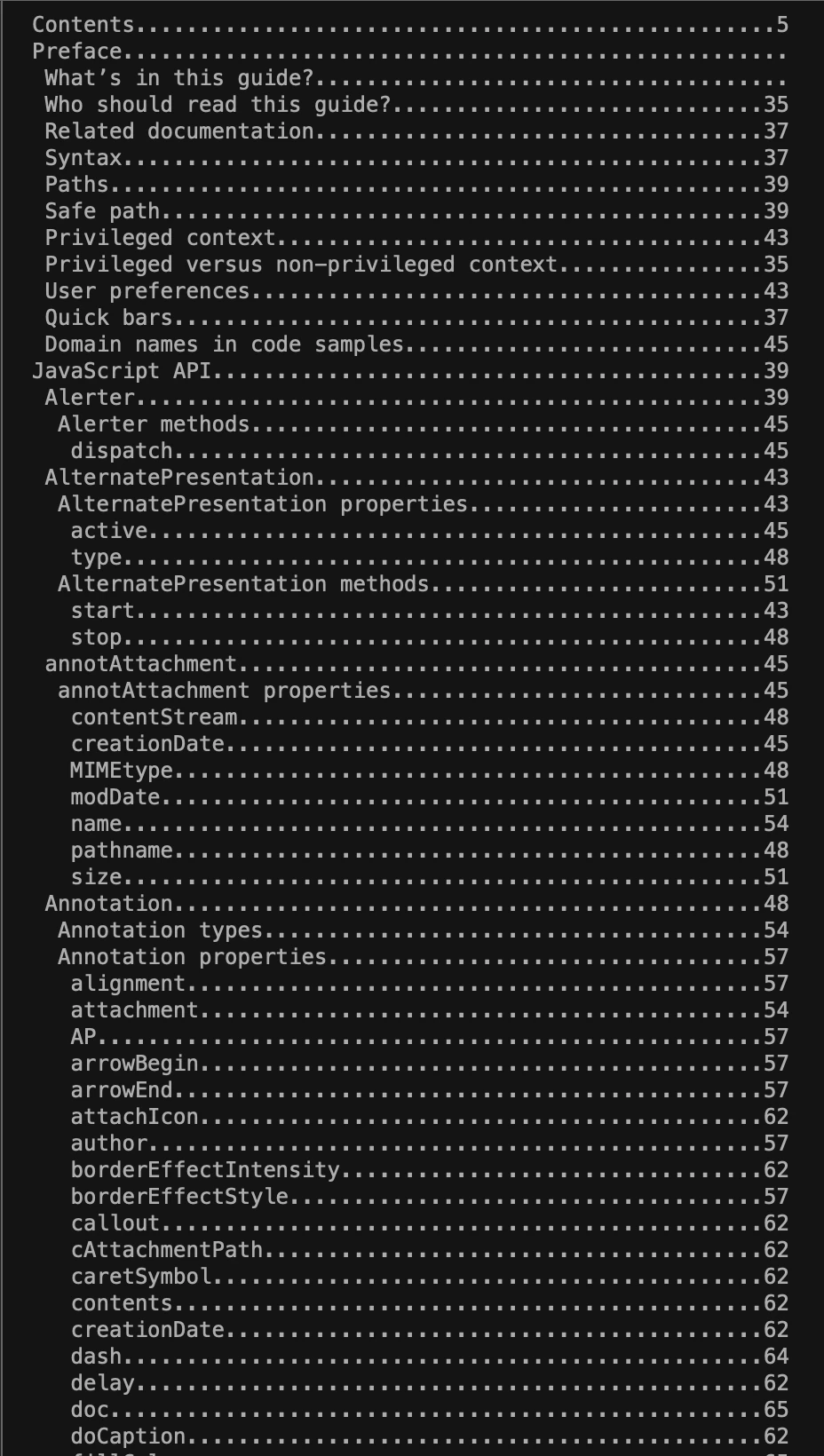
With this script you generate a txt file containing the table of contents.

I don't know the duration of your script for your 2000-page document!

I did a test with my api reference file (805 pages) and that took a bit more than 3 minutes.
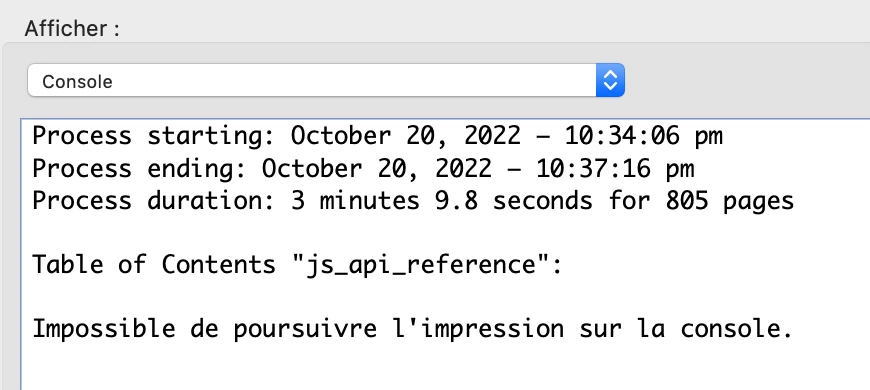
With a quite long toc the result can't be displayed in the console but you will have the entire toc in the attached toc.txt file.
Attached is a pdf file including an action wizard with the script... Let me know!

@+

2 replies

bebarth
Community Expert
Community Expert
October 18, 2022

hi,
Try this script and let me know if it suits to you:

function DumpBookmark(bkm, nLevel)
{
    var s = "";
    for (var i = 0; i < nLevel; i++) s += " ";
	//
	bkm.execute();
	var p=this.pageNum;
	var pageName="";
	var numWords=this.getPageNumWords(p);
	for (var i=0; i<numWords; i++) {
		var ckWord=this.getPageNthWord(p, i, false);
		var q=this.getPageNthWordQuads(p, i);
		m=(new Matrix2D).fromRotated(this,p);
		mInv=m.invert();
		r=mInv.transform(q);
		r=r.toString();
		r=r.split(",");
		if (Number(r[0])>300 && Number(r[1])<35) pageName+=ckWord;
	}
    if (bkm.name!="Root" && pageName!="") console.println(s + "+-" + bkm.name.replace(/\s$/,"")+" -> page: "+pageName.replace(/\s$/,""));
	// console.println(s + "+-" + bkm.name);
	//
    if (bkm.children != null)
        for (var i = 0; i < bkm.children.length; i++)
            DumpBookmark(bkm.children[i], nLevel + 1);
}
console.clear(); console.show();
console.println("Dumping all bookmarks in the document.");
DumpBookmark(this.bookmarkRoot, 0);

I give you r0 and r1 in accordance with the screenshot you supplyed and these values will certainly have to be corrected...

@+

Participating Frequently
October 20, 2022
quote

hi,
Try this script and let me know if it suits to you:


function DumpBookmark(bkm, nLevel)
{
    var s = "";
    for (var i = 0; i < nLevel; i++) s += " ";
	//
	bkm.execute();
	var p=this.pageNum;
	var pageName="";
	var numWords=this.getPageNumWords(p);
	for (var i=0; i<numWords; i++) {
		var ckWord=this.getPageNthWord(p, i, false);
		var q=this.getPageNthWordQuads(p, i);
		m=(new Matrix2D).fromRotated(this,p);
		mInv=m.invert();
		r=mInv.transform(q);
		r=r.toString();
		r=r.split(",");
		if (Number(r[0])>300 && Number(r[1])<35) pageName+=ckWord;
	}
    if (bkm.name!="Root" && pageName!="") console.println(s + "+-" + bkm.name.replace(/\s$/,"")+" -> page: "+pageName.replace(/\s$/,""));
	// console.println(s + "+-" + bkm.name);
	//
    if (bkm.children != null)
        for (var i = 0; i < bkm.children.length; i++)
            DumpBookmark(bkm.children[i], nLevel + 1);
}
console.clear(); console.show();
console.println("Dumping all bookmarks in the document.");
DumpBookmark(this.bookmarkRoot, 0);


@bebarthThankyou for the script!

However I decided to go another route and use NodeJS for this task. Since running a script on a 2000+ page document inside Adobe Debugging console (this is the only way I know, there are probably other ways too) was a bit too much and time consuming, I decided to make an actual NodeJS script to do this task.


I am posting the logic below for anyone who wants to use or for anyone requiring logic to perform this on their own programming language of choice.


Two node packages were required for


// Project dependencies from package.json
"dependencies": {
    "pdf.js-extract": "^0.2.0",
    "pdfjs-dist": "^2.16.105"
}


The task was divided in two parts.

1. Extract outline and the corresponding PDF Document Page Number and save it in JSON for later use.


app.js


const pdfjsLib = require("pdfjs-dist/legacy/build/pdf.js");
const fs = require("fs");
const url = "Path to the PDF";
const LoadDocument = pdfjsLib.getDocument(url);

let docOutline = []; // Empty array to store document outline

/**
 * Get PDF outline and call `getToc` with initial indent of 0
 */

const getOutline = async () => {
  const pdf = await LoadDocument.promise;
  const bookmarks = await pdf.getOutline();
  await getToC(pdf, bookmarks, "");
  fs.writeFileSync("PDFOutline.json", JSON.stringify(docOutline));
};

/**
 *
 * @param {PDFDocumentProxy} pdf - PDFDocumentProxy returned when LoadDocument Resolves
 * @param {Object[]} bookmarks - Array returned when `getOutline()` method of `PDFDocumentProxy` Resolves
 * @param {String} indent - Amount of indentation to be applied to Bookmark Title, used when being recursively called
 */
const getToC = async (pdf, bookmarks, indent) => {
  //for..of loop for synchronous processing of each bookmark item in an array
  for await (const bookmark of bookmarks) {
    // For Each Bookmark item, get its page index (page 1 will be have an index of 0)
    const dest = await pdf.getDestination(bookmark.dest);
    const pageNumIndex = await pdf.getPageIndex(dest[0]);
    // Adding the title, page number and level of indent
    docOutline = [
      ...docOutline,
      {
        title: indent + bookmark.title,
        pageNumber: pageNumIndex + 1,
        level: indent.length / 2,
      },
    ];
    if (bookmark.items) {
      await getToC(pdf, bookmark.items, indent + "  ");
    }
  }
};
getOutline();


2. Extract Displayed Page Number on each PDF Document Page associated with the bookmarks from the previously saved JSON and save the result in yet another JSON for later use


extractOutline.js


const fs = require("fs");
const PDFExtract = require("pdf.js-extract").PDFExtract;
const data = require("./PDFOutline.json");
const url = "Path to the PDF";
var options = {};
var tocLine = "";
tableOfContents = [];
var prevPageNum; // Page number to be assigned to this variable at the end of each loop iteration for comparison
var prevDispPage; // Display Page number to be assigned to this variable at the end of each loop iteration for comparison

const pdfExtract = new PDFExtract();

const extractOutline = async () => {
  for await (bookmark of data) {
    const pageNumber = bookmark.pageNumber;
    options = {
      firstPage: pageNumber,
      lastPage: pageNumber,
      password: null,
      verbosity: -1,
      normalizeWhitespace: false,
      disableCombineTextItems: false,
    };
    if (pageNumber === prevPageNum) {
      tocLine = bookmark.title.padEnd(60, ".") + prevDispPage.padStart(6, ".");
      console.log(tocLine);
      tableOfContents = [
        ...tableOfContents,
        {
          title: bookmark.title,
          pdfPageNum: bookmark.pageNumber,
          displayPage: prevDispPage,
          indent: bookmark.level,
        },
      ];
    } else {
      const pdfData = await pdfExtract.extract(url, options);
      for await (page of pdfData.pages) {
        for await (content of page.content) {
          // Change Extraction Criteria based on requirements.
          // Needs trial and error to figure out the exact conditions
          // For Display Page Number Extraction,
          // User may benefit from running this alogorithm on a single page
          // and apply text-matching comparison in the condition below
          // then note the position of the text
          if (content.x > 590 && content.y > 500 && content.height == 6.96) {
            tocLine =
              bookmark.title.padEnd(60, ".") + content.str.padStart(6, ".");
            console.log(tocLine);
            tableOfContents = [
              ...tableOfContents,
              {
                title: bookmark.title,
                pdfPageNum: bookmark.pageNumber,
                displayPage: content.str,
                indent: bookmark.level,
              },
            ];
            prevDispPage = content.str;
            prevPageNum = bookmark.pageNumber;
          }
        }
      }
    }
  }
};

const execute = async () => {
  await extractOutline();
  fs.writeFileSync(
    "TableOfContentWithLevel.json",
    JSON.stringify(tableOfContents)
  );
};

execute();


Here is the part of console logging I got:

Since the whole thing is now saved in JSON, it can easily be used in any way required.

bebarth
Community Expert
bebarthCommunity ExpertCorrect answer
Community Expert
October 20, 2022

Hi,

I gave you a quick answer, but spending a bit more time it is possible to improve the script.

Here is what I did:

d0=new Date();
debut=util.printd("date(en){MMMM DD, YYYY}",d0,true)+util.printd(" – hh:MM:ss tt",d0);;
function tableOfContents(bkm, nLevel) {
    var s="";
    for (var i=0; i<nLevel; i++) s+=" ";
	bkm.execute();
	var p=this.pageNum;
	console.clear();
	console.println("Process starting: "+debut);
	console.println("Processing the page #"+(p+1)+"/"+this.numPages);
	var pageName="";
	var numWords=this.getPageNumWords(p);
	for (var i=0; i<numWords; i++) {
		var ckWord=this.getPageNthWord(p, i, false);
		var q=this.getPageNthWordQuads(p, i);
		m=(new Matrix2D).fromRotated(this,p);
		mInv=m.invert();
		r=mInv.transform(q);
		r=r.toString();
		r=r.split(",");
		if (Number(r[0])>300 && Number(r[1])<35) pageName+=ckWord;
	}
    if (bkm.name!="Root") {
		var designation=bkm.name.replace(/\t/g," ").replace(/\s*$/,"");
		var pageName=pageName.replace(/\s*$/,"");
		toc+=s+designation+dots.substr(0,dots.length-(s.length+designation.length+pageName.length))+pageName+"\r";

	}
    if (bkm.children != null) for (var i=0; i<bkm.children.length; i++) tableOfContents(bkm.children[i], nLevel+1);
}
var aRect=this.getPageBox("Crop");
var h=aRect[1];
aRect[1]=50;
this.setPageBoxes({cBox: "Crop", rBox: aRect});
var toc="";
var dots="............................................................";
tableOfContents(this.bookmarkRoot, 0);
aRect[1]=h;
this.setPageBoxes({cBox: "Crop", rBox: aRect});
this.createDataObject("toc.txt", "","text/html");
var oFile=util.streamFromString(toc);
this.setDataObjectContents("toc.txt", oFile);
event.target.viewState={overViewMode:7};
df=new Date();
fin=util.printd("date(en){MMMM DD, YYYY}",df,true)+util.printd(" – hh:MM:ss tt",df);;
console.println("\rProcess ending: "+fin);
temps=(df.valueOf()-d0.valueOf())/1000/60;
var lesMinutes=parseInt(temps);
var lesSecondes=(temps-lesMinutes)*60;
var lesSecondes=parseInt(lesSecondes*10)/10;
var leTemps="";
if (lesMinutes>0) {
	if (lesMinutes==1) var leTemps="1 minute";
	else var leTemps=lesMinutes+" minutes";
}
if (lesSecondes>0) {
	if (lesSecondes<2) var leTemps=leTemps+" "+lesSecondes+" second";
	else var leTemps=leTemps+" "+lesSecondes+" seconds";
}
var leTemps=leTemps.replace(/^\s+|\s+$/gm,"");
console.clear(); console.show();
console.println("Process starting: "+debut);
console.println("Process ending: "+fin);
console.println("Process duration: "+leTemps+" for "+numPages+" pages");
console.println("\rTable of Contents \""+this.documentFileName.replace(/.pdf$/i,"")+"\":\r\r");
console.println(toc);

With this script you generate a txt file containing the table of contents.

I don't know the duration of your script for your 2000-page document!

I did a test with my api reference file (805 pages) and that took a bit more than 3 minutes.

With a quite long toc the result can't be displayed in the console but you will have the entire toc in the attached toc.txt file.

Attached is a pdf file including an action wizard with the script... Let me know!

@+

Bernd Alheit
Community Expert
Community Expert
October 18, 2022

With the mezhod getPageNthWordQuads you can test the coordinates of the words.

Participating Frequently
October 18, 2022

Thanks for the reply. The method getPageNthWordQuads only returns the boundary coordinates. I used getPageNth word to find the displayed page number and then used the getPageNthWordQuads to get the bounding box. Since the Nth word for displayed page number differs for each page, I am hopeful that the bounding box will remain same.


However, I still am not sure how to extract the text from the bounding box

Bernd Alheit
Community Expert
Community Expert
October 18, 2022

Loop over all words and test the bounding box.