
Participant
December 9, 2021
Question

Extraño galimatías visual en algunos documentos

  • December 9, 2021
  • 1 reply
  • 1286 views

Tengo la versión más reciente de Adobe Acrobat Reader y pasa que en algunos documentos, parte del texto no se ve correctamente. Es como si no pudiera cargar alguna fuente. En otro equipo si abro el mismo .pdf y con la misma versión de Acrobat Reader no sucede.
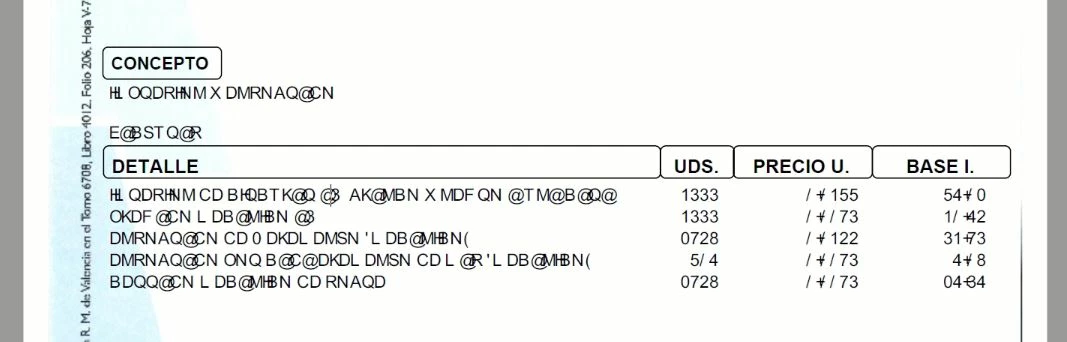
 

Curiosamente no se muestran esos caracteres aleatoriamente, sino que salen con una posición inmediatamente anterior en el ASCII. Es decir, por ejemplo en la última línea, BDQQ@CN significa realmente CERRADO, pues a la C le precede la B, a la E le precede la D, a la R le precede la Q, etc.

¿Alguien podría decirme algo?

Gracias.


This topic has been closed for replies.

1 reply

Amal.
Community Manager
Community Manager
December 10, 2021

Hi Alejandro


Hope you are doing well and sorry for the trouble. As described, some of the text is not seen correctly in the PDF file.


It seems to the font issue. The required font is not properly embedded into the PDF file or it is not present on your computer or you do not have the permission to use the required font.


Please go to Edit (Win) , Adobe Acrobat (MAC) > Preferences > Page Display > Under rendering, select 'Use Local fonts' > Click OK and reboot the computer and check if that helps.


Regards

Amal

Participant
January 4, 2022

Hola.


La casilla de Local Fonts permanecía marcada y continúa este problema vigente.


Un saludo.

Amal.
Community Manager
Community Manager
January 4, 2022

Hi there


We are sorry to hear that. Is this a behavior with a particular PDF file or with all the PDFs? PLease try with a different PDF file and check. If its a file specific issue  please share the file with us for checking. https://helpx.adobe.com/document-cloud/help/sharing-pdfs.html


Also please go through the help page https://helpx.adobe.com/document-cloud/help/sharing-pdfs.html for more information about font embedding.


Regards

Amal