


Participant
August 23, 2022
Answered

Fail to create pdf

  • August 23, 2022
  • 1 reply
  • 917 views

When I try to create a pdf from the print menu, it fails. Have had Support from Adobe, but they haven't solved it yet. 
I choose "Adobe PDF" and press "Print", choose a filename and press "save". A box appears saying "creating Adobe PDF"
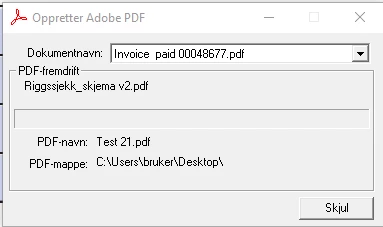


And nothing happends... Please help!


This topic has been closed for replies.
Correct answer Seilservice AS

Hi Amal and thanks for your support. 

Actually I spoke to the Adobe support team and they helped me with screen sharing. The problem was solved by uninstalling the 64 bit version and installing the 32 bit version. Works well now!

1 reply

Amal.
Community Manager
Community Manager
August 23, 2022

Hi there


Hope you are doing well and sorry for the trouble.


Please go through the help page https://helpx.adobe.com/acrobat/kb/troubleshoot-acrobat-pdfmaker-problems-office.html and see if that helps.


Regards

Amal

Participant
August 24, 2022

Hi Amal and thanks for your reply. 

My issue is not with Office, or it might be, but I'm not using office when this occurs. 

Amal.
Community Manager
Community Manager
August 29, 2022

Hi there


Would you mind sharing the version of the Application and the OS you are using? To check the version of the application go to Help > About Acrobat and make sure you have the recent version 22.2.20191 installed. Go to Help > Check for updates and reboot the computer and check.


Also, try to with a different file and check. It would be very helpful if you can share a small video recording of the steps you are doing and the issue you are experiencing for a better understanding.


~Amal