Participant
May 15, 2025
Answered

Fast Web View setting for Large PDFs changes from Yes to No after saving

  • May 15, 2025
  • 1 reply
  • 1515 views

Does anyone have any ideas to to resolve a problem with the Fast Web View setting changing from Yes to No after saving and reopening the PDF? This only seems to happen on large PDFs (5-10K pages, 40-70MB)

These PDFs also need to be secured as well.

Correct answer creative explorer

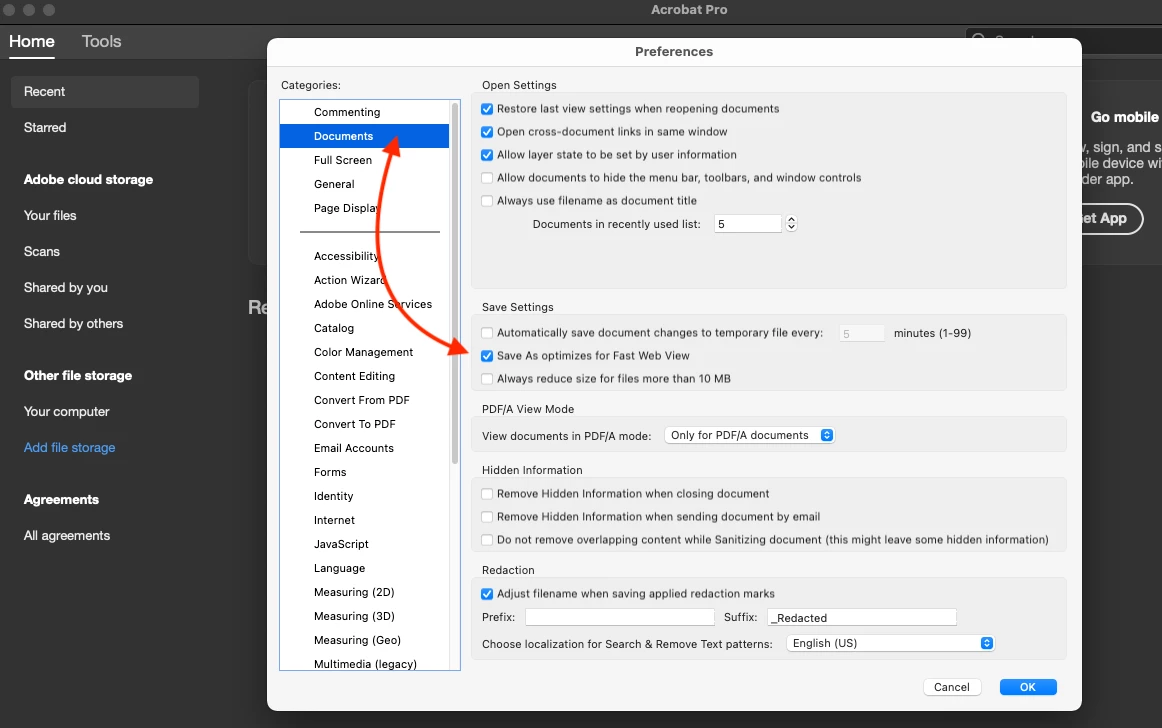
@paul_1621  did you try using Acrobat Preferences? Command K (MAC) or Control K (PC)

  • Go to Edit > Preferences > Documents.
  • Ensure that "Save As optimizes for Fast Web View" is selected. If it is already selected, try deselecting it, saving, and then re-selecting it.


1 reply

creative explorer
Community Expert
creative explorerCommunity ExpertCorrect answer
Community Expert
May 16, 2025

@paul_1621  did you try using Acrobat Preferences? Command K (MAC) or Control K (PC)

  • Go to Edit > Preferences > Documents.
  • Ensure that "Save As optimizes for Fast Web View" is selected. If it is already selected, try deselecting it, saving, and then re-selecting it.


m
paul_1621Author
Participant
May 16, 2025

Thank you for the suggestion.

Several of us keep experiencing this problem. Somehow, the Fast Web View value changes after it is initially set to Yes. Upon reopening the file it mysteriously flips to No. 

We've tried every combination of steps we can think of. I suspect this is an Adobe/Microsoft bug.

Meenakshi_Negi
Legend
May 16, 2025

Hi paul_1621,


Thank you for reaching out.


As the option is still flipped to No, can you please share the screen recording showing what happens when you enable the option? 

Please share the Acrobat and OS versions on the machine. Also, let us know if you use a personal or work machine. We will check this. 


Thanks,

Meenakshi