Inspiring
January 5, 2023
Answered

Faulty document view

  • January 5, 2023
  • 3 replies
  • 2334 views

The 'workbase basics' advice on acrobat says: "The menu bar and the toolbar are visible at the top of the work area."  They are not on mine and don not look anything like the picture.  There is limited info at the top of the document and a minimal toolbar on then right hand side.  I have tried both repairing and uninstalling and reinstalling but that makes no difference.  I am running Acrobat 64-bit 22.003.20282 on Windows 11.  How can I get back to the old view which I know and love please?
This topic has been closed for replies.
Correct answer Bernd Alheit

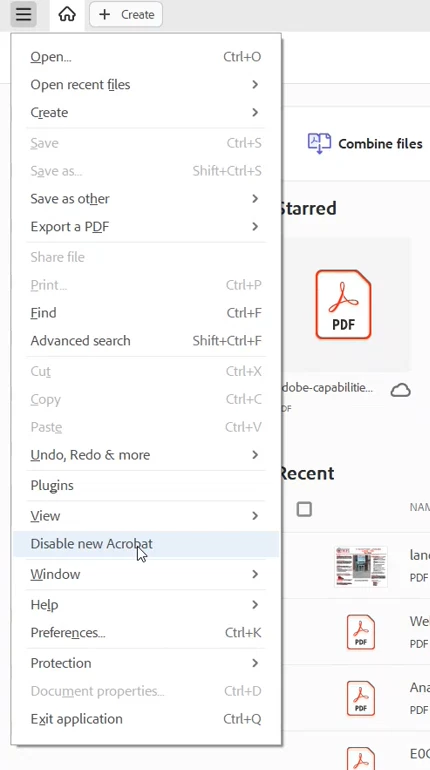
Switch to the old version:

3 replies

Bernd Alheit
Community Expert
Bernd AlheitCommunity ExpertCorrect answer
Community Expert
January 5, 2023

Switch to the old version:

Inspiring
January 5, 2023

Many thanks - all sorted now

Amal.
Legend
January 6, 2023

Hi @francisc75144729 


We are glad to hear that all is sorted out now.


Got your issue resolved? Please label the response as 'Correct Answer' to help your fellow community members find a solution to similar problems.


Regards

Amal

Amal.
Legend
January 5, 2023

Hi @francisc75144729 


Hope you are doing well.


++ Adding to the discssion.


Are you referring to the new, modern user interace for Acrobat and Reader? If yes,  Users can switch between the old and new UI by choosing View > Enable|Disable New Acrobat (Mac) or Hamburger menu > Enable|Disable New Acrobat (Windows)


For more information, please go through the help page https://www.adobe.com/devnet-docs/acrobatetk/tools/Preferences_by_version/Windows/07_12_2022.html


Let us know if you are referring to something else.


Regards

Amal

Inspiring
January 5, 2023

Thanks Amal.

I have just uploaded Acrobat within my current sub to a new PC so had no idea there was a new version.
You will see I have supplied a screenshot in response to Eric's request.  As you can see there is no View tab to use - hence my problem
Francis

Eric Dumas
Community Expert
Community Expert
January 5, 2023

Hi,

Can you share a screenshot of your view?

Inspiring
January 5, 2023

Thanks Eric - as attached
Francis