
Question
Fields Properties Unavailable Service Request# 5480399
Hi Team,
I am trying to edit fields in a PDF form using the Prepare Form function:
- The PDF form is a minimum 2-page/maximum 7-page document. I am trying to access the Properties of all of these fields to update the Options:
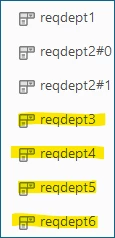
- I can successfully edit reqdept1 and reqdept2#1 accessing their Properties (right-click, Properties).
- I cannot edit reqdept3, reqdept4, reqdept5, reqdept6 – if I right-click these fields, no menu appears – which seems to be because looking at only 2 pages, the fields are hidden therefore the Properties can’t be accessed.
- reqdept3, reqdept4, reqdept5, reqdept6 will only display for editing if I 'click here to purchase another item':

- The form has the capability to purchase a minimum of 1 item up to a maximum of 6 items on 1 PDF form (pages 1-6 inclusive), with page 7 reserved for Requestor details and Financial Approval.
- As the form by default needs to be limited to the original/minimum 2 pages, I do not want to display the other 5 pages in order to edit the fields, otherwise the form will remain expanded (too many pages) and display information that isn’t required from the Requestor.
- I have tried adding the additional 5 pages, editing the fields, then deleting the additional pages, but if I do, the ‘Click here to purchase another item’ button disappears from the entire PDF (and prevents more than 1 purchase being requested).
Does anyone have any suggestions?


 AdChoices